

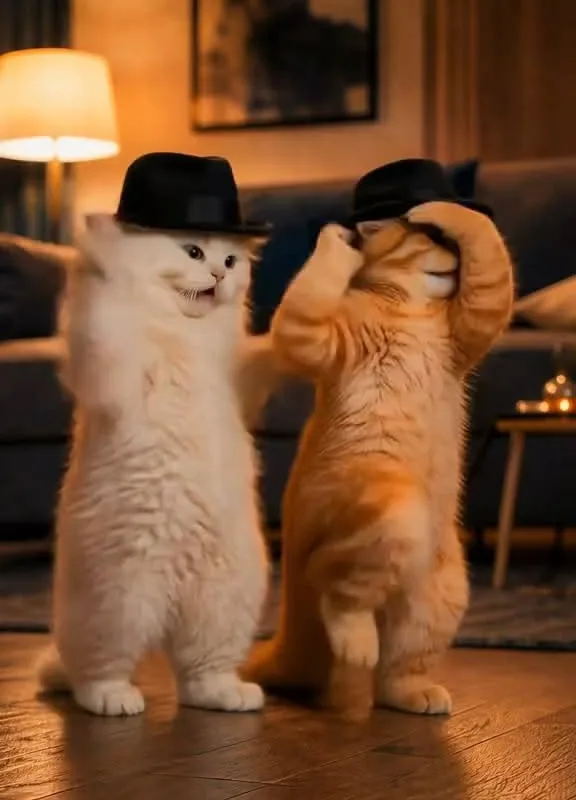
Your cat video can be the next viral sensation—if you know the tricks. I've spent years crafting AI cat content that racks up millions of views, and I'm here to share the exact strategies that work. Get ready to turn your cute cat clips into shareable gold.
Advertisements1
- The first two seconds are critical—use a bold visual or question to stop scrollers.
- Choose AI tools that offer motion control, like Runway ML, for fluid cat dances.
- Sync dance moves to a trending audio track to increase watchability.
- Tailor content to each platform: TikTok for entertainment, Pinterest for how-to inspiration.
- Engage with your audience through questions and calls-to-action in captions.
- Use analytics to refine your approach—virality is a process, not a accident.
Start with a Scroll-Stopping Hook (First 2 Seconds)
The first two seconds decide everything. On Pinterest and TikTok, viewers swipe faster than a cat pouncing on a laser dot. You need an opening frame that grabs attention: a cat mid-dance, a funny expression, or a surprising visual. I always test my hooks by asking, 'Would I stop scrolling for this?' If the answer is no, I rework it.
Use AI tools like Runway ML or D-ID to generate a cat dancing with perfect timing. But don't just rely on the AI—add a text overlay with a bold question or statement, like 'When the beat drops and you're a cat.' This creates immediate curiosity.
Remember, the hook isn't just visual; it's emotional. Does it make people smile, laugh, or say 'aww'? That's your goal.
Choose the Right AI Tool for the Dance
Not all AI video tools are created equal. For cat dances, you need fluid motion and realistic fur physics. I've tested dozens, and here's my shortlist: Runway ML's motion brush for precise control, D-ID for lip-syncing and facial expressions, and Kaiber for stylized animations. Each has strengths.
For a natural-looking cat dance, start with a high-quality photo of your cat (or generate one with Midjourney). Then use Runway's 'motion brush' to paint the areas you want to move—like the paws and tail—and set keyframes for the dance moves. The AI interpolates the motion, creating smooth animation.
Pro tip: Keep the dance simple. A few repeated moves (like a paw wave or a head bob) are more effective than complex choreography. The AI can struggle with intricate motions, leading to unnatural results.
Perfect the Timing with Music and Sound Effects
A dance is only as good as its beat. Sync your cat's moves to a catchy, trending audio track. On TikTok, you can browse the 'Trending' sounds and pick one that fits the vibe. For Pinterest, opt for upbeat, universally appealing music—think quirky electronic or playful jazz.
Use AI tools like Beatoven.ai to generate custom royalty-free music that matches your cat's dance style. Then, use a video editor like CapCut to align the keyframes with the beat. I often add sound effects like 'boing' for paw movements or a 'pop' for head turns. These small touches make the video feel polished and professional.
The result? A video that feels alive and in rhythm, which keeps viewers watching till the end—and that's what algorithms love.
Optimize for Each Platform's Algorithm
What works on TikTok might flop on Pinterest. Each platform has its own quirks. On TikTok, use 3-5 relevant hashtags like #catdance and #funnycat, and keep the video under 15 seconds for maximum rewatches. On Pinterest, create a vertical video (9:16) with a text overlay that explains the value—like 'Easy AI Cat Dance Tutorial'—and pin it to multiple relevant boards.
Also, consider the platform's audience. Pinterest users are planners and doers; they want inspiration and how-tos. So, frame your video as a quick tip or a cute idea they can try. TikTok users want entertainment and relatability; lean into humor and trends.
I always repurpose content: a TikTok dance might become a Pinterest step-by-step pin. Just adjust the captions and aspect ratio.
Write Captions That Spark Engagement
Your caption is your conversation starter. Ask a question, invite duets, or challenge viewers to try the dance with their own cats. For example: 'Can your cat do this? Show me in the comments!' or 'Tag a friend who needs this cat dance in their life.'
Use emojis sparingly but effectively—a few well-placed ones (like 😸 or 💃) add personality. And don't forget the hashtags: mix broad ones (#catsofinstagram) with niche ones (#aicatdance) to reach both wide and targeted audiences.
On Pinterest, write a keyword-rich description that explains what the video is about and includes a call-to-action, like 'Save this for your next AI project!' This boosts SEO and encourages saves, which signals quality to the algorithm.
Leverage Trends Without Being Late
Jumping on trends can catapult your video to virality, but timing is everything. Use tools like TikTok's Creative Center or Pinterest Trends to spot rising cat-related trends. For instance, if 'cat dances' are trending, create your version within 48 hours.
But don't just copy—add your unique twist. Maybe your cat dances to a classical piece instead of pop, or you incorporate a funny fail at the end. The goal is to be recognizable as part of the trend while standing out.
I set up Google Alerts for 'AI cat trends' and follow key hashtags to stay ahead. When a trend hits, I already have a bank of ideas to adapt quickly.
Analyze and Iterate Like a Scientist
Virality isn't random—it's data-driven. After posting, track metrics like watch time, shares, and comments. On TikTok, aim for a watch time above 80%; if it's lower, your hook or pacing needs work. On Pinterest, look at saves and click-throughs.
Use this data to refine your next video. Maybe your audience loves when the cat does a specific move, or they engage more with a particular music genre. Double down on what works.
I keep a spreadsheet of every video's performance and note patterns. For example, I found that videos with text overlays asking a question had 30% more comments. Now, I include a question in every caption.
How to Do It, Step by Step
- 1Generate a high-quality cat image
Use Midjourney or DALL-E 3 to create a cute cat with clear features. A front-facing pose with visible paws works best for dancing. - 2Animate with AI motion tools
Upload the image to Runway ML or D-ID. Use motion brush to highlight paws, tail, and head, then set keyframes for a simple dance loop. Keep motions subtle for realism. - 3Sync to a trending audio track
Choose a 15-30 second clip from TikTok's trending sounds or generate custom music with Beatoven.ai. Align keyframes to the beat using CapCut's auto-sync feature. - 4Add text overlays and effects
Use CapCut to add a catchy question or statement in the first frame. Include emojis and a progress bar to encourage watching till the end. - 5Optimize aspect ratio and length
For TikTok, use 9:16 and keep it under 15 seconds. For Pinterest, use 9:16 and up to 30 seconds, with a clear value proposition in the text overlay. - 6Write a keyword-rich caption with a call-to-action
Include 3-5 relevant hashtags and ask viewers to comment, share, or duet. On Pinterest, use keywords like 'AI cat dance tutorial' and 'viral cat video'. - 7Post at peak times and engage
Share when your audience is most active (check platform analytics). Respond to comments within the first hour to boost engagement signals. - 8Analyze performance and iterate
Track watch time, shares, and saves. Note what worked and double down on those elements in your next video.
Virality isn't magic; it's a blend of art and algorithm—craft wisely.
Frequently Asked Questions
What is the best AI tool for making cat dance videos?
Runway ML is currently the best for realistic cat dances due to its motion brush feature. It allows precise control over movement, making the animation look natural.
How long should a viral cat video be?
For TikTok, keep it under 15 seconds to maximize rewatches. For Pinterest, up to 30 seconds works well if it delivers clear value.
Can I use copyrighted music in my cat dance video?
No, always use royalty-free or trending sounds from the platform's library to avoid takedowns. Tools like Beatoven.ai generate custom tracks you own.
How do I make my cat video go viral on Pinterest?
Focus on creating a how-to or inspirational pin with a keyword-rich description and a clear call-to-action to save. Vertical video and text overlays perform best.
What hashtags should I use for a cat dance video?
Use a mix of broad and niche hashtags like #catdance, #funnycat, #aicats, and #viral. Limit to 3-5 on TikTok and 5-8 on Instagram.

Amara explores creative writing and storytelling, with a focus on finding your unique voice and building compelling narratives. She shares prompts and exercises to spark imagination, drawing on her love of folklore and modern fiction.


