

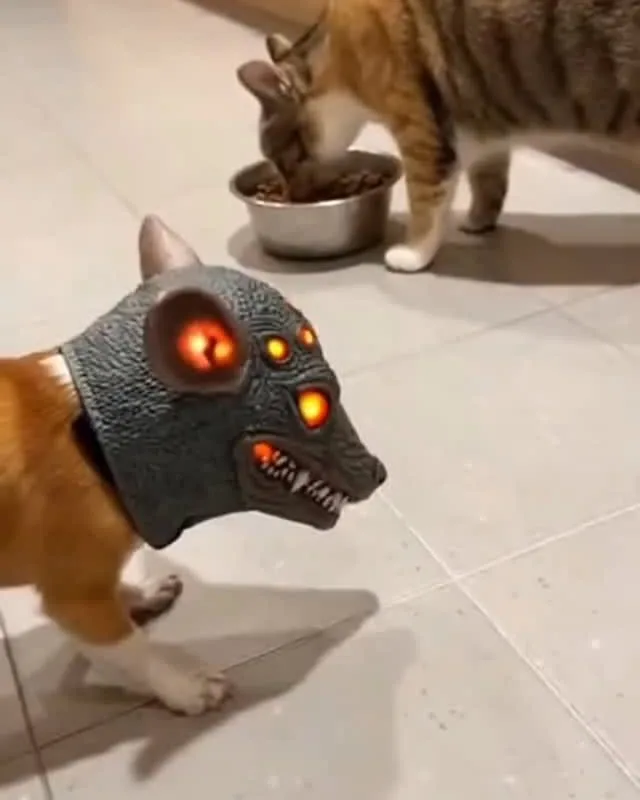
You've seen the clip: a cat rounds a corner, spots a cucumber, and launches three feet straight up like a furry firework. It's hilarious, it's everywhere under #funny and #newarrivals, and it's also a masterclass in how not to scare your cat. Here's how to capture that lightning-in-a-bottle moment in a way that's genuinely funny, technically sharp, and kind to the animal doing all the work.
Advertisements1
- The funniest cat videos imply the scare through editing and sound — they never cause genuine fear in the animal.
- Shoot at 60fps and floor level; a cat's pounce lasts about 0.3 seconds and low angles make it feel cinematic.
- Diffused window light beats any ring light — direct light makes cats squint and kills the comedy.
- Cut to 5-7 seconds; completion rate drives reach on Pinterest and short-form video.
- Three to five relevant hashtags outperform 30 stuffed ones — #funny plus a niche tag plus #newarrivals is a solid stack.
- If the cat shows fear signals (flat ears, puffed tail, hissing), stop filming. That's the ethical and algorithmic line.
Why 'Scary Cat' Videos Go Wrong (And What to Do Instead)
The classic cucumber video is the cautionary tale here. Cats associate sudden unfamiliar objects near their food bowl with predators, and a 2015 study in Animal Cognition found that startled cats show elevated cortisol and avoidance behaviors for hours afterward. That's not a funny reaction — that's a stress response you're monetizing. Do this instead: build the 'scare' around anticipation and sound design, not genuine fear. A cat staring wide-eyed at a doorway while you add a creaking-door sound in editing reads as comedy. A cat genuinely panicking reads as cruelty to half your audience and gets you reported.
The practical rule I use: if the cat's ears are pinned flat, its tail is puffed, or it's hissing, stop filming and put the phone down. Those are fear signals, not funny signals. Wide eyes, slow blinks, and the classic 'head tilt' are your green lights. The difference between those two states is the entire ballgame.
The Gear That Matters (And What You Can Skip)
You don't need a cinema camera. A modern phone shooting 1080p at 60fps is plenty — the higher frame rate matters because a cat's pounce happens in about 0.3 seconds, and 60fps gives you smooth slow-motion on playback. Shoot in 4K at 30fps if your phone allows it, then export at 1080p; you get cropping room in editing without paying for storage.
Skip the ring light. Cats hate direct, bright light — it dilates their pupils and makes them squint, which kills the comedy. Use a window with diffused daylight instead. I shoot almost everything near a north-facing window in the late afternoon, and the soft light makes fur look incredible on camera. For audio, don't rely on the phone mic; record a separate voiceover or use royalty-free sound effects (a rubber-chicken squeak, a cartoon boing) layered over the clip. That's where 80% of the funny lives.
Set the Scene Without Ambushing Your Cat
The setup is where amateurs blow it. Never hide behind a couch and jump out — that's a genuine predator simulation and your cat will remember it. Instead, create a 'mystery' the cat investigates on its own terms. Put a harmless object (a paper bag, a cardboard box, a toy spider) somewhere in the room and let the cat discover it. Film from a low angle, phone at floor level, so the cat looks enormous and the object looks ominous.
A trick I use constantly: film the cat's reaction first, then film an empty hallway or dark doorway separately, and cut them together. The 'scary' part is implied, not experienced. Your cat gets a fun puzzle; your audience gets the jump-scare payoff. Everyone wins, including the algorithm.
Lighting and Angles That Sell the Scare
Horror is a lighting genre, and cat videos are no exception. Shoot slightly underexposed — drop your phone's exposure by about one stop by tapping and dragging the sun icon down. That deepens shadows and makes the cat's eyes glow, which is exactly what you want. A single warm lamp behind the cat creates a silhouette effect that reads as 'haunted house' without any editing tricks.
Get low. If you're filming standing up, you're filming a cat from a human's perspective, which is boring. Kneel or lie on the floor so the camera is at the cat's eye level. This is the single biggest upgrade most people can make. It makes the cat the protagonist instead of a prop, and it makes the 'scare' feel like it's happening to the viewer.
Editing: Where the Comedy Actually Happens
Your raw clip is probably 8 seconds of a cat looking at a box. The magic is in the edit. Cut it to 5-7 seconds max — Pinterest and Reels reward completion rate, and a tight clip gets watched twice. Add a suspenseful audio sting (a low string note, a heartbeat) in the first 2 seconds, then a comedic sound effect at the 'reveal' moment. Silence before a loud sound is the oldest trick in horror and it still works on a phone screen.
Add captions. About 75% of viewers watch with sound off initially, so an on-screen caption like 'he heard something…' does the setup work for you. Keep text large, high-contrast, and in the top third so it doesn't cover the cat. And resist the urge to over-edit with 12 zoom-ins and a laugh track — one clean cut and one well-timed sound effect beats a chaotic montage every time.
Posting for #newarrivals and #funny Without Getting Flagged
Hashtags like #funny are a firehose — millions of posts a day. You'll get buried unless your first frame is a hook. Use a thumbnail or opening frame where the cat is mid-reaction, eyes wide, ears up. Don't open with a title card; open with the cat. Then layer #newarrivals for freshness and a niche tag like #catsoftiktok or #scarycat for discoverability. Three to five tags is plenty; stuffing 30 looks spammy and dilutes relevance.
One more thing: if your video shows a cat genuinely distressed, platforms are increasingly demonetizing and downranking it, and viewers will call it out in the comments. The 'scary' should be in the framing, the music, and the edit — never in the cat's actual experience. That's the line between a video that gets shared and one that gets you ratioed.
How to Do It, Step by Step
- 1Watch your cat for 10 minutes first
Note when your cat is relaxed and playful (ears forward, tail up, slow blinks). That's your filming window. A relaxed cat produces better, funnier footage than a startled one, every time. - 2Set your phone to 1080p at 60fps
Higher frame rate gives you smooth slow-motion for the pounce. Open your camera settings and switch it before you start — you can't add frames back later. - 3Place a harmless mystery object and wait
A paper bag or cardboard box in the middle of the floor invites investigation. Let the cat approach on its own schedule. Film from floor level, phone braced against a book or cushion. - 4Drop exposure by one stop
Tap the screen, then drag the brightness slider down slightly. Deeper shadows and glowing eyes sell the horror-comedy mood without any editing. - 5Capture a separate 'ominous' shot
Film an empty doorway or dark hallway for 3 seconds. You'll cut this in before the reaction to imply the scare without causing one. - 6Edit to 5-7 seconds with one sound sting
Trim ruthlessly. Add a low suspense note at the start and one comedic sound effect at the reveal. Add a short caption for sound-off viewers. - 7Check for stress signals before posting
If the cat's ears were flat, tail puffed, or it hissed, don't post it. Refilm with a calmer setup — your audience and your cat will both thank you.
The scariest-looking cat video should be the safest one for the cat — all the terror lives in the edit, not the animal.
Frequently Asked Questions
Is it cruel to make scary cat videos?
It can be, if the cat is genuinely startled or frightened. A cat that's playing or curious is fine to film; a cat with flat ears, a puffed tail, or hissing is stressed, and you should stop. The safe approach is to create suspense through editing and sound rather than real scares.
What's the best frame rate for filming cats?
Shoot at 1080p and 60fps. Cats move explosively and unpredictably, and the higher frame rate lets you slow the footage down smoothly for the pounce or jump without it looking choppy.
Why do cats freak out at cucumbers?
Cats often react defensively because a sudden unfamiliar object appearing near their food or resting spot triggers a predator-avoidance response. It's a stress reaction, not playfulness, which is why many experts advise against staging it.
How long should a funny cat video be?
Aim for 5 to 7 seconds. Short clips get watched multiple times, which boosts completion and rewatch rates — the metrics that platforms use to decide whether to push your video to more people.
Do hashtags like #funny actually help a cat video get seen?
They help with categorization but they're extremely crowded, so pair them with a niche tag. Use three to five total — for example #funny, #newarrivals, and #scarycat — rather than stuffing dozens, which dilutes relevance.

Liam covers technology and digital privacy, with a focus on helping everyday people protect their data online. He breaks down complex tech concepts into easy-to-understand advice and reviews privacy tools from a user’s perspective.


