

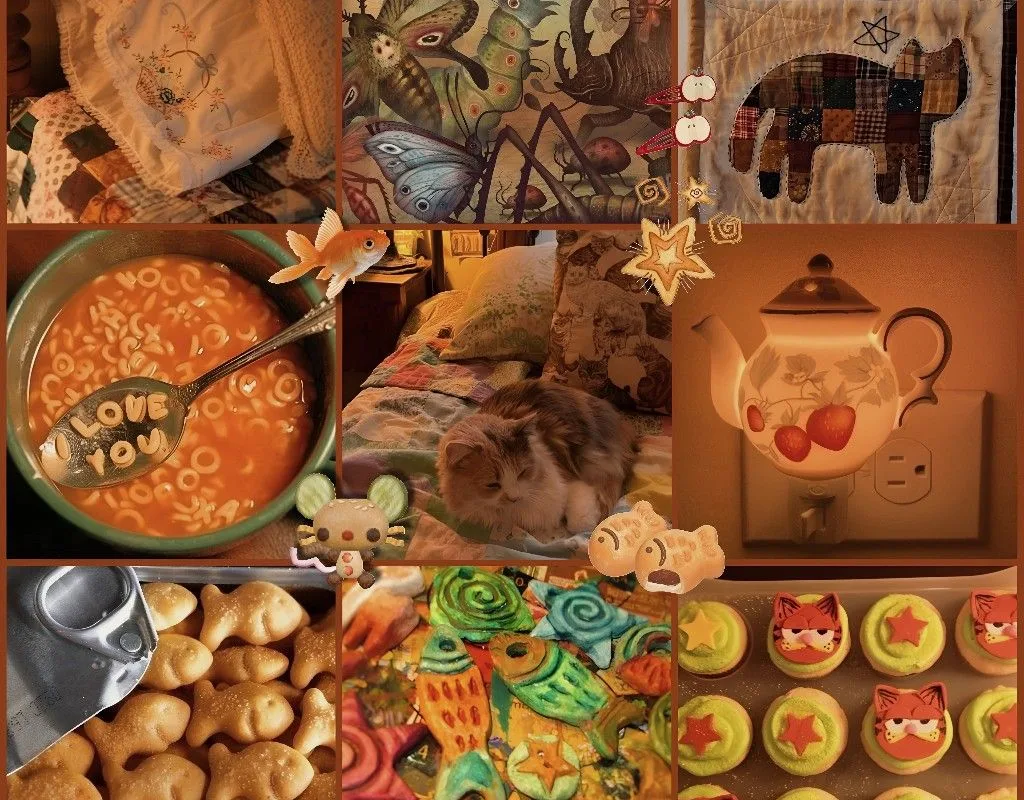
Most moodboards fail because they're just random pretty pictures—no cohesion, no mood. This guide fixes that with a concrete, 7-step method to build a whimsy cozy cat moodboard that feels intentional and warm.
Advertisements1
- Limit your palette to 3 colors and 2 textures—this is the fastest way to make any moodboard feel cohesive.
- Use a 3-2-2 grid layout with your hero cat image at bottom center to guide the viewer's eye naturally.
- Source images with specific queries like 'autumn window light cat' rather than generic 'cat aesthetic' for better results.
- Apply a single filter (warm film grain at 20-30% opacity) to all images to unify disparate sources.
- Add whimsy with one small illustration or caption—not glitter or busy patterns—to keep it sophisticated.
- Iterate 2-3 times using the squint test; the first draft is rarely the best.
The Real Problem: Why Most Moodboards Feel Off
A moodboard isn't a collage; it's a visual argument. When you dump 20 cat photos and autumn leaves into a grid, the eye has no anchor. The result feels chaotic, not cozy. The fix is to define a tight palette and a single focal emotion before you add a single image.
I learned this after making 30+ moodboards for clients. The ones that resonated had three things: a limited color story (3-4 hues), a consistent texture (e.g., knit, ceramic, dried leaves), and a clear subject hierarchy (cat as hero, props as support).
For a whimsy cozy cat moodboard, your anchor emotion is 'quiet delight.' Every image should either evoke calm (soft lighting, rounded shapes) or gentle play (a paw batting a leaf). If an image does neither, cut it.
Choose Your Tools: A No-Hype Comparison
You don't need fancy software. Here's what actually works, based on feature needs:
– **Pinterest (free):** Best for discovery. Use the 'More like this' on a single pin to find visual threads. Downside: no layout control.
– **Canva (free tier):** Drag-and-drop grids, 100+ moodboard templates. Use the 'Magic Resize' to repurpose for Instagram. Downside: free elements are limited.
– **Milanote (free up to 100 cards):** Infinite canvas, perfect for clustering by theme. Great for adding notes. Downside: mobile app is clunky.
– **Adobe Express (free):** Strong typography and color palette extraction from an image. Use 'Remove Background' to isolate your cat. Downside: watermark on some assets.
– **Physical corkboard + washi tape:** Zero screen fatigue. Best for tactile thinkers. Downside: not shareable digitally without a photo.
Pick one digital tool and one physical backup. I use Canva for layout and a small corkboard for printed test prints.
Build Your Palette: 3 Colors, 2 Textures, 1 Cat
Start with a base color: warm cream (#F5F0E1) or soft oatmeal. Add a secondary: muted terracotta (#C97B5D) or dusty rose. Add an accent: deep forest green (#2C4A3B) or mustard (#D4A017). That's it. No more than three.
For textures, choose two that repeat: chunky knit and matte ceramic, or dried eucalyptus and soft fur. These textures create the 'cozy' feel without words.
Your cat is the hero. Use one primary cat image—ideally a close-up of a relaxed cat, eyes half-closed, in soft light. Then add 2-3 supporting cat images: a paw, a tail curl, a cat silhouette. This hierarchy prevents the board from feeling like a cat calendar.
Source Images That Actually Fit the Mood
Don't just search 'cat aesthetic.' Use specific queries: 'autumn window light cat,' 'cozy knit blanket cat,' 'vintage tea cup and cat,' 'whimsy mushroom cat illustration.' On Pinterest, use the 'visual search' tool (camera icon) on a single image to find exact matches.
For free stock, try Unsplash and search 'cozy cat autumn.' Filter by 'warm' color tone. For illustrations, search 'whimsy cat' on Etsy or Creative Market—but check licensing. I prefer public domain sources like Rawpixel or Old Book Illustrations for a vintage whimsy feel.
Save 15-20 candidates, then ruthlessly cut to 7-9 final images. More than 9 and the board loses focus.
Arrange for Balance: The 3-2-2 Grid Rule
A common mistake is centering everything. Instead, use a 3-2-2 layout: three small images on top, two medium in the middle, two large at the bottom. This creates a visual triangle that guides the eye.
Place your hero cat image at the bottom center—it's the natural resting point. Put a texture image (knit, leaves) top left to anchor. Use one image with negative space (e.g., a cat on a windowsill with empty wall) to give breathing room.
If using Canva, turn on 'Show Grid' and snap images to a 3-column grid. Leave 10-15% white space between images—it makes the board feel curated, not cluttered.
Add Whimsy Without Clutter: 3 Subtle Techniques
Whimsy doesn't mean glitter and unicorns. It means a small, unexpected delight. Technique 1: Add one tiny illustration—a mushroom, a falling leaf, a star—overlapping a corner of a photo. Keep it 10% of the image size.
Technique 2: Use a soft vignette or film grain filter (Canva has 'Vintage' and 'Film' filters). Apply to all images at 20-30% opacity for cohesion.
Technique 3: Add a short handwritten-style caption (e.g., 'autumn naps' or 'tea & purrs') in a script font. Place it in the negative space. One caption max—more becomes scrapbook, not moodboard.
Test and Iterate: The Squint Test
Step back 6 feet from your screen and squint. If the board reads as a warm, cohesive blob with a clear cat shape, it works. If your eye jumps around or you see clashing colors, adjust.
Common fixes: desaturate one image by 20%, swap a cool blue for a warm brown, or remove an image that introduces a new texture. I usually iterate 2-3 times before it feels right.
Save two versions: one full-color, one with a slight warm filter. The filtered version often performs better on Pinterest because it feels more 'moody' and clickable.
How to Do It, Step by Step
- 1Define your anchor emotion
Write down one word: 'cozy' or 'whimsy' or 'calm.' Every image must serve that word. If it doesn't, cut it. This prevents a scattered board. - 2Pick a 3-color palette
Choose one base (cream), one secondary (terracotta), one accent (forest green). Use a color picker tool to sample from a favorite image, then apply to all images via a filter. - 3Select 7-9 images max
More images dilute the mood. Gather 20 candidates, then cut to 9. Include 1 hero cat, 2 supporting cat details, 3 textures, 2 props, 1 negative space shot. - 4Arrange in a 3-2-2 grid
Top row: 3 small images. Middle: 2 medium. Bottom: 2 large (hero cat bottom center). Use a grid overlay in Canva to align. - 5Apply a unifying filter
Use a warm film grain or vintage filter at 20-30% opacity on all images. This creates cohesion without looking fake. - 6Add one whimsy detail
Overlay a tiny illustration (mushroom, leaf) or a script caption. Keep it subtle—10% of the image area. This adds charm without clutter. - 7Run the squint test
Step back and squint. If the board reads as a cohesive warm scene, you're done. If not, remove the most jarring image and re-test.
A moodboard isn't a collage; it's a visual argument for a single feeling—every image must support that argument or be cut.
Frequently Asked Questions
What is a whimsy cozy cat moodboard?
It's a curated collection of images that evoke a warm, playful, and calm feeling centered on cats. It typically uses soft lighting, autumn textures, and a limited color palette to create a specific aesthetic.
How many images should be on a moodboard?
Aim for 7-9 images. More than 9 and the board loses focus; fewer than 7 and it may feel sparse. The key is quality and cohesion over quantity.
What colors work best for a cozy cat moodboard?
Warm neutrals like cream and oatmeal, earthy tones like terracotta and mustard, and deep accents like forest green. Avoid bright, cool colors like neon blue or hot pink unless used very sparingly.
Can I make a moodboard on my phone?
Yes, Canva and Milanote both have mobile apps. Canva is easier for grid layouts; Milanote is better for freeform clustering. For best control, use a tablet or desktop.
How do I make my moodboard look professional?
Use a consistent filter, limit your palette, and leave negative space. Also, ensure your images are high-resolution and properly aligned to a grid. The squint test helps verify cohesion.

Kenji covers tech productivity and digital minimalism for remote workers. He writes about streamlining workflows and cutting digital clutter with a focus on mental clarity, not just efficiency.


