

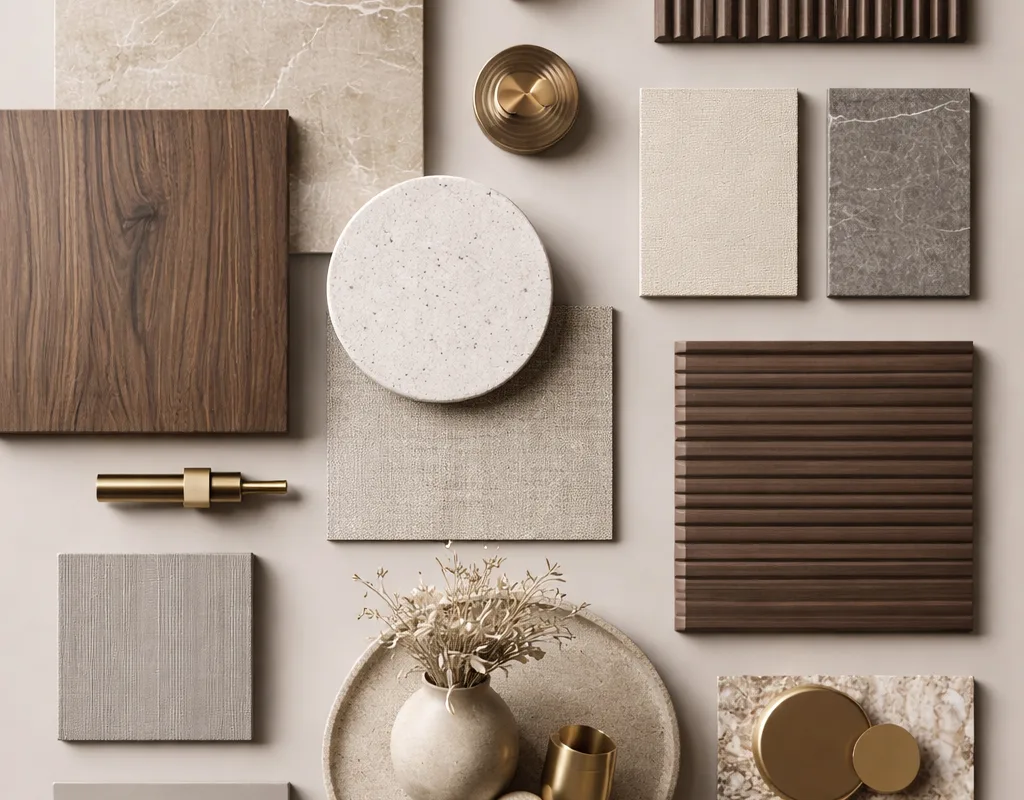
Ever tried to build a flat lay that feels calm and expensive at the same time? It is a bit like making a really good bowl of soup: too many ingredients and it turns into a muddy mess, too few and it tastes like nothing. The trick with a neutral material moodboard is restraint, plus a tiny hit of shine to wake everything up. Wood, stone and brass are that shine. Below are 17 genuinely useful places to gather textures, palettes and material references, starting with the one that sparked this whole search.
Advertisements1
Table of Contents(Click to Toggle)
- Why a Neutral Material Moodboard Beats a Random Photo Dump
- 17 Places to Build a Wood, Stone and Brass Moodboard
- 1. Pinterest
- 2. Behance
- 3. ArchDaily
- 4. Dezeen
- 5. Design Milk
- 6. Material Bank
- 7. Modlar
- 8. SampleBoard
- 9. Coolors
- 10. Adobe Color
- 11. Are.na
- 12. Cosmos
- 13. Savee
- 14. Fabrik
- 15. Unsplash
- 16. Pexels
- 17. Canva
- Bonus: Milanote
- Bonus: Figma
- Bonus: Morpholio Board
- Bonus: Kuler by Adobe (Legacy Swatch Browser)
- Bonus: Texture Libraries on Wikimedia Commons
- The Quiet Power of a Well-Built Moodboard
Why a Neutral Material Moodboard Beats a Random Photo Dump
A moodboard is just a visual shopping list. Instead of words like “two onions, one carrot,” you collect “warm oak, honed limestone, brushed brass.” The difference between a board that convinces a client and one that confuses them is usually not talent, it is sourcing. If your references come from ten different lighting conditions and five different decades, the palette will fight itself. Neutral schemes are especially unforgiving: beige, taupe and greige only look luxurious when the undertones agree. So the real skill is finding image and material libraries that let you filter by tone, finish and texture, not just by vibes. That is what the 17 tools below are for. Some are giant inspiration engines, some are niche material databases, and a few are quiet little corners of the internet where architects stash their best finds.
17 Places to Build a Wood, Stone and Brass Moodboard
1. Pinterest : The fastest way to assemble a neutral flat lay reference board
What it is: A visual discovery and bookmarking platform where you save images into themed boards.
Category: Inspiration and curation.
Why it stands out:
- Searching “neutral material moodboard” or “wood stone brass flat lay” returns thousands of ready-made compositions.
- The visual similarity tool lets you tap one image and pull up near-identical palettes, which is perfect for matching undertones.
- Sectioned boards let you separate wood, stone and metal references without mixing them up.
Best for: Beginners who need a fast, free starting point before refining with material samples.
2. Behance : Portfolio-grade interior and material studies from working designers
What it is: Adobe’s portfolio network for creative professionals across graphic, industrial and spatial design.
Category: Portfolio inspiration.
Why it stands out:
- Search “material board” or “interior concept” and you get full case studies, not just pretty singles.
- Many projects include the actual sample names and finishes used, which is rare on social platforms.
- You can follow specific studios and get a steady drip of neutral, texture-led work.
Best for: Designers who want to see how a board evolves into a finished space.
3. ArchDaily : Real buildings with real material specifications
What it is: One of the largest architecture publications, with a searchable project database.
Category: Architecture reference.
Why it stands out:
- Each project page lists materials and sometimes the exact products used, so you can trace a limestone wall back to a supplier.
- The photo sets are shot in consistent daylight, which makes comparing stone tones far easier.
- Filters by country and typology help you find warm, minimalist work rather than scrolling endlessly.
Best for: Anyone who wants their moodboard grounded in buildable reality, not just aesthetics.
4. Dezeen : Editorial interiors coverage with a strong material focus
What it is: A London-based design and architecture magazine publishing daily news and project features.
Category: Design journalism.
Why it stands out:
- Their interiors section regularly features neutral, tactile schemes with close-up texture shots.
- Product stories introduce new brass hardware and stone finishes before they hit mainstream retail.
- The writing explains why a material was chosen, which is useful when you need to justify a palette.
Best for: Readers who want context and vocabulary, not just images.
5. Design Milk : Fresh product and surface finds in warm neutral tones
What it is: An online design magazine covering interiors, products and technology.
Category: Design blog.
Why it stands out:
- Their product roundups often group items by color story, which is handy for beige and taupe palettes.
- Coverage leans toward smaller studios, so you find brass and stone pieces you will not see everywhere else.
- Articles are short and skimmable, ideal for a quick inspiration top-up.
Best for: Sourcing accent objects to sit inside your flat lay.
6. Material Bank : Order physical samples of wood, stone and metal finishes
What it is: A material marketplace that lets design professionals search and order samples from hundreds of brands.
Category: Material sourcing.
Why it stands out:
- You can filter by color family, so narrowing to warm neutrals takes seconds.
- Samples ship next-day in the US, which turns a digital board into a tactile one fast.
- Each sample page includes specs like finish, thickness and application, useful for spec sheets.
Best for: Designers and serious renovators who need to touch the material before committing.
7. Modlar : A building product library built for visual browsing
What it is: A platform where architects and designers discover and save building products.
Category: Product library.
Why it stands out:
- Boards work like Pinterest but for real, purchasable products with manufacturer links.
- You can browse by material type, including natural stone and architectural metals.
- It keeps a record of what you saved, which is a lifesaver on long projects.
Best for: Turning inspiration into a specification list without leaving one tab.
8. SampleBoard : Drag-and-drop moodboard builder with a materials mindset
What it is: A web-based moodboard and concept board tool aimed at interior and fashion designers.
Category: Moodboard software.
Why it stands out:
- Templates are sized for presentation, so boards look intentional rather than improvised.
- You can add text labels to each swatch, which is how you communicate “brushed brass, unlacquered” clearly.
- It handles color palettes and image grids in the same canvas.
Best for: Presenting a neutral scheme to a client or partner.
9. Coolors : Generate and lock a beige-to-taupe palette in seconds
What it is: A fast color palette generator with a browser and mobile app.
Category: Color tool.
Why it stands out:
- The palette generator can be nudged toward warm neutrals by adjusting hue and saturation sliders.
- You can extract a palette straight from a photo, which is perfect for pulling tones out of a stone sample.
- Contrast checker helps confirm text and accent colors stay readable in presentations.
Best for: Nailing the exact hex codes behind your wood, stone and brass story.
10. Adobe Color : Build harmonies and pull palettes from reference images
What it is: Adobe’s free color wheel and palette tool.
Category: Color tool.
Why it stands out:
- Extract Theme from Image reads a photo and returns five usable swatches, great for taupe and greige ranges.
- Harmony rules like analogous and compound help you add a brass accent without breaking the calm.
- Palettes save to your Adobe account and sync into Creative Cloud apps.
Best for: Designers already working inside Adobe tools.
11. Are.na : Quiet, ad-free collecting for people who hate algorithm feeds
What it is: A minimalist platform for saving images, links and notes into channels.
Category: Curation platform.
Why it stands out:
- No likes, no follower counts, no recommended feed, just your blocks in order.
- Channels can be nested and connected, so a “stone” channel can feed a “neutral interiors” channel.
- Public channels from architects and stylists are searchable and often beautifully curated.
Best for: Deep researchers who want signal without noise.
12. Cosmos : A visual search engine tuned for aesthetic references
What it is: An image discovery and saving tool with a clean, gallery-like interface.
Category: Visual search.
Why it stands out:
- Its clustering surfaces visually similar images, so one good stone photo leads to a whole family of them.
- Clusters can be saved as collections, which keeps a moodboard coherent.
- The interface stays out of the way, which matters when you are comparing subtle tones.
Best for: Finding texture references you cannot quite describe in words.
13. Savee : A bookmarking tool built for visual professionals
What it is: An image-saving platform popular with art directors and interior stylists.
Category: Inspiration bookmarking.
Why it stands out:
- Search is keyword-driven and surprisingly good for terms like “limestone texture” or “brushed brass detail”.
- Boards can be shared with a link, which simplifies client review.
- Uploads from your own camera roll sit alongside saved finds in one grid.
Best for: Stylists building a reusable library of material close-ups.
14. Fabrik : Simple portfolio and asset storage for creative teams
What it is: A platform for storing, organising and sharing creative assets and portfolios.
Category: Asset management.
Why it stands out:
- Assets keep their original resolution, so a stone texture stays crisp when printed.
- Collections can be shared with clients who do not need an account.
- It doubles as a lightweight portfolio if you want to publish a finished board.
Best for: Small studios juggling multiple moodboards at once.
15. Unsplash : Free high-resolution texture photography you can actually use
What it is: A stock photo library with a permissive free license.
Category: Stock photography.
Why it stands out:
- Searches like “oak grain”, “travertine” and “brass hardware” return clean, well-lit close-ups.
- The license allows commercial use without attribution, which keeps client work simple.
- Download sizes go large enough for print boards.
Best for: Filling gaps in a board when you cannot photograph a sample yourself.
16. Pexels : A second free photo source for surfaces and fabrics
What it is: Another free stock photo and video library with a similar license.
Category: Stock photography.
Why it stands out:
- Its collection skews toward lifestyle and interior scenes, which helps place materials in context.
- Videos are included, useful if your moodboard is actually a moving reel.
- Search filters by orientation and color make neutral-only browsing quick.
Best for: Adding a human or lived-in element to a material board.
17. Canva : Assemble the final flat lay without design software
What it is: A browser-based design tool with templates, grids and a huge asset library.
Category: Design software.
Why it stands out:
- Grid and frame tools make it easy to lay out swatches in a tidy flat lay arrangement.
- You can upload your own sample photos and drop them beside stock textures.
- Export options cover social formats, which is handy if the board is going on Pinterest.
Best for: Anyone who wants a polished board in under an hour.
Bonus: Milanote : A visual workspace where boards and notes live together
What it is: A flexible canvas for organising ideas, images and tasks.
Category: Project workspace.
Why it stands out:
- You can pin a material swatch next to the supplier note and the client feedback in one view.
- Boards export as PDF, which suits presentation handoffs.
Best for: Managing a whole room scheme, not just the moodboard.
Bonus: Figma : Precise layout control for detailed material boards
What it is: A collaborative interface design tool that handles any layout.
Category: Design software.
Why it stands out:
- Auto layout and alignment tools keep swatch grids perfectly even.
- Comments let a client react to individual samples.
Best for: Designers who want pixel-level control and easy sharing.
Bonus: Morpholio Board : An iPad moodboard app made for interior designers
What it is: A tablet app for building concept and material boards.
Category: Mobile moodboard app.
Why it stands out:
- It includes a product library with real furniture and material items.
- Boards can be exported with a spec list attached.
Best for: Designers who work on site and want to build boards on a tablet.
Bonus: Adobe Color Wheel : Quick harmony checks for accent tones
What it is: A focused tool for testing how one color relates to others.
Category: Color tool.
Why it stands out:
- Useful for checking whether a brass gold leans too yellow against your chosen greige.
- Instant visual feedback without saving anything.
Best for: Fast sanity checks mid-board.
Bonus: Wikimedia Commons : Public-domain texture and material imagery
What it is: A vast media repository maintained by the Wikimedia community.
Category: Open media library.
Why it stands out:
- Geological and architectural photos are often public domain, so usage is straightforward.
- Great for specific stone types when stock libraries come up short.
Best for: Niche material references and historical finishes.
The Quiet Power of a Well-Built Moodboard
Here is the thing about neutral material boards: the calm is the point, and calm takes work. A beige palette with the wrong undertones looks like a beige waiting room. A beige palette with matched undertones, one warm wood, one honed stone and one small brass accent looks like a hotel lobby you want to move into. The tools above cover the whole journey, from the first scroll on Pinterest to the moment a physical sample lands on your desk. My advice? Pick three sources, not seventeen. Gather your references, order two or three real samples, and let your eyes decide in daylight. That is how a digital flat lay becomes a room people actually want to sit in. What is the one material you always reach for when a scheme needs rescuing? I would love to hear your go-to. Stay curious, stay safe.

Kwame writes about technology and digital privacy for everyday users. He breaks down complex topics like data tracking and encryption into simple, relatable terms.


