

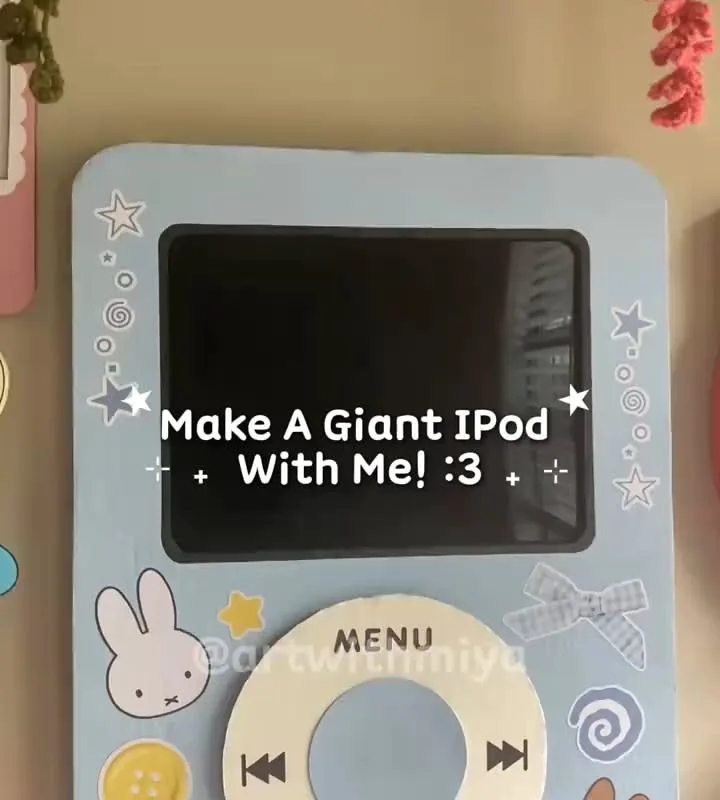
A giant foam-board iPod is one of those room decor projects that looks impossible on Pinterest and takes about two hours on your kitchen table. I've built four of these now — one lives on my desk, one got stolen by my little cousin — and these are the seven hacks that make yours look genuinely real instead of craft-fair sad.
Advertisements1
- The 1:1.66 width-to-height ratio is the single thing that makes a giant iPod read as an iPod — measure before you cut.
- A layered screen (flat black paint plus a glossy vinyl or photo-paper topcoat) looks real; a painted screen never does.
- Two thin paint coats beat one thick coat every time — thick acrylic warps foam board as it dries.
- Mount with hook-and-loop tape plus one hidden nail; tape alone fails in warm rooms.
- Build two at once — the second takes about 40 minutes once your supplies are already out.
- Cluster your bubble stickers in one screen corner instead of spacing them evenly for a photo-ready composition.
Start With the Right Ratio (This Is Where Most iPods Go Wrong)
A real classic iPod is roughly 2.4 inches wide by 4 inches tall — a 1:1.66 ratio. Scale that up to 20 inches tall and your width is about 12 inches. Skip this step and you get a squat rectangle that reads as 'generic phone,' not iPod, and no amount of cute bubble stickers will save it.
Grab a ruler and a pencil before you even touch the foam board. I mark my dimensions on the back of the board in light pencil, then cut with a craft knife against a metal ruler rather than scissors — scissors bow the foam and you get wavy edges that show under paint.
One more ratio note: the click wheel diameter should be about 40% of the body width. On a 12-inch-wide build, that's a 4.8-inch circle. Trace a mug, a bowl, whatever's in your cabinet that's close.
Layer the Screen Instead of Painting It
The single biggest glow-up is a layered screen. Paint the screen area flat black first, let it dry fully (about 30 minutes for acrylic on foam), then cut a slightly smaller rectangle of glossy black vinyl or a photo printed on glossy paper and stick it down. That second layer catches light and gives you the glassy sheen that flat paint never will.
For the 'now playing' look, print a tiny album cover at 2×3 inches and glue it in the lower-left of the screen with a thin strip of white paper above it as the track title bar. I use a 6pt font in a word processor, print, and cut — it reads as real text from three feet away, which is all that matters.
If you want the screen to actually glow, cut the screen rectangle out entirely and back it with a sheet of frosted acrylic plus a battery-powered LED puck light taped behind. That's a 15-minute upgrade and it's the thing everyone comments on.
Get the Click Wheel Texture Right
The click wheel is a matte gray ring with a slightly recessed center button — not a flat circle. Cut two circles: a 4.8-inch ring from light gray cardstock and a 2-inch center button from a slightly darker gray. Glue the ring down, then glue the button on top with a foam square behind it so it sits about 2mm proud.
For the four symbols (menu, play/pause, forward, back), print them at about half an inch and cut them out with tiny scissors, or use a fine-tip black marker directly on the cardstock. I've done both — printed looks cleaner, marker looks more handmade, pick your vibe.
Mistake to avoid: don't use hot glue on the wheel. It cures lumpy and shows through light gray cardstock. Use a thin line of tacky glue and press for 20 seconds.
Paint the Body Before You Assemble Anything
Paint the flat foam board body first, edges included, then attach the screen and wheel. Two thin coats of white acrylic with a foam brush, 20 minutes between coats. Thin coats, not one thick one — thick acrylic on foam board warps it as it dries and you'll get a banana-shaped iPod.
If you want that classic silver, use a metallic spray paint in light passes from 10 inches away. Spray paint eats bare foam, so seal the board with a coat of Mod Podge first and let it dry a full hour.
This is also when you add the little details: a thin black strip at the top for the headphone jack, a small rectangle at the bottom for the dock connector. Those two marks are what make people do a double-take.
Mount It So It Doesn't Fall on Your Head
A 20-inch foam iPod weighs under a pound, but it's a big flat sail. For wall mounting, use two strips of heavy-duty hook-and-loop tape (the 5-pound-rated kind) plus one small nail through a hidden spot at the top. The tape alone will fail in a warm room; the nail alone lets it swing. Together they hold for years.
For a desk or shelf lean, cut a small triangle of foam board as a kickstand and glue it at a 15-degree angle about 2 inches up from the bottom. I've had one leaning like this on a bookshelf for eight months with zero issues.
If you're hanging it above a bed, skip the tape entirely and use two small L-brackets screwed into a stud. It's overkill for foam, but it's the difference between decor and a 2 a.m. surprise.
Style It With the Bubbles and Props People Actually Save
The bubble stickers and little floating hearts are what make this photo stop the scroll — but placement matters. Cluster three to five bubbles in one corner of the screen, not scattered evenly. Even spacing reads as wallpaper; a cluster reads as a deliberate composition.
Add one physical prop: a coiled white cord taped to the side, a tiny pair of wired earbuds hanging off the headphone jack, or a mini 'now playing' sticky note. One prop, not five. I keep a drawer of cheap wired earbuds from the dollar store specifically for this.
Lighting for the photo: window light from the side, phone at eye level with the iPod, no overhead light. That side light is what makes the foam read as a real object with depth.
Batch-Build Two at Once (It's Barely More Work)
Every step here has setup and cleanup — the paint, the cutting mat, the glue. Building two iPods takes maybe 30% longer than one and gives you a matching pair for a gallery wall or a gift for a friend.
Cut all four body pieces at once, paint them all in the same session, and let them dry together. I built a pink and a silver one in a single afternoon and the second one took 40 minutes flat because everything was already out.
This is also your safety net: if one screen layer wrinkles, you've got a backup body already painted and ready. Improvise the second one — different color, different screen, whatever you're feeling.
The Hacks, Step by Step
- 1Measure and mark the 1:1.66 ratio
Mark a 12×20-inch rectangle on the back of your foam board in pencil. This ratio is what makes it read as an iPod instead of a generic rectangle. - 2Cut with a craft knife against a metal ruler
Score twice and snap rather than pressing hard once — you get clean edges with no foam crumble. - 3Seal, then paint two thin coats
Seal with Mod Podge if using spray paint, then apply two thin acrylic coats 20 minutes apart to avoid warping. - 4Layer the screen
Paint black, dry 30 minutes, then add a glossy vinyl or photo-paper layer plus a tiny printed album cover and track bar. - 5Build the click wheel in two layers
Glue a 4.8-inch gray ring, then a 2-inch darker center button on a foam square so it sits 2mm proud. - 6Add the jack and dock details
A thin black strip at top and a small rectangle at bottom — these two marks trigger the double-take. - 7Mount with tape plus one hidden nail
Hook-and-loop tape handles the flat surface, the nail stops it swinging. For shelves, glue a 15-degree kickstand. - 8Style one prop and shoot in side light
Cluster three to five bubbles in one screen corner, add one cord or earbud prop, and photograph with window light at eye level.
The difference between a craft-project iPod and a photo that stops the scroll is almost entirely the layered screen and the two tiny jack-and-dock details.
Frequently Asked Questions
What size should a giant DIY iPod be?
Aim for 20 inches tall and about 12 inches wide to keep the real 1:1.66 iPod ratio. Anything from 8 inches (nightstand size) to 24 inches (statement wall piece) works as long as you hold that ratio.
What's the best material for a giant iPod prop?
Foam board is best because it's lightweight, cuts cleanly, and holds paint without warping. Corrugated cardboard doubled up back-to-back is the closest substitute and costs nothing.
How do I hang a foam board iPod on the wall without it falling?
Use 5-pound-rated hook-and-loop tape plus one small nail through a hidden spot at the top. The tape holds the flat surface and the nail stops it from swinging or peeling off in warm air.
Can I make the screen actually light up?
Yes — cut the screen rectangle out entirely, back it with frosted acrylic, and tape a battery-powered LED puck light behind it. It takes about 15 minutes and it's the detail people comment on most.
How long does this project take?
About two hours total, including 40 minutes of drying time between paint coats. Building a second one in the same session adds roughly 40 minutes.


