

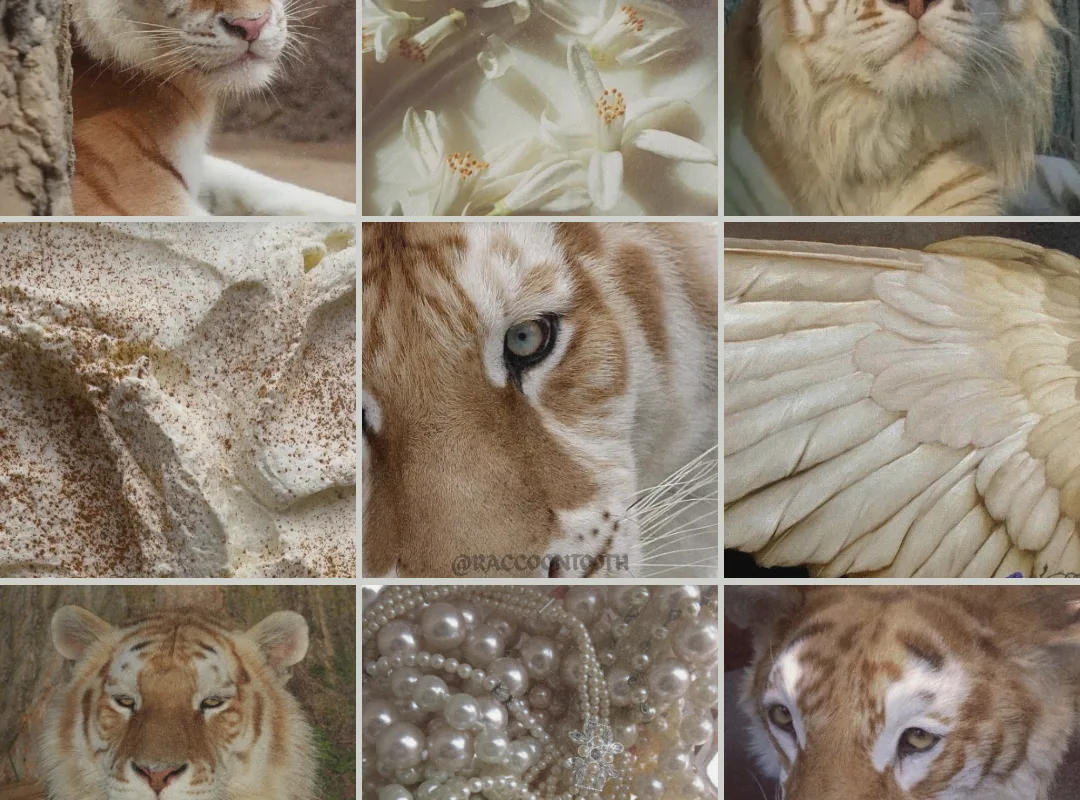
A golden tiger moodboard isn't just about slapping tiger images on a board. It's about capturing the fierce elegance and warm glow that makes this aesthetic so captivating. In this guide, I'll show you exactly how to build a moodboard that feels intentional and inspiring, with concrete tips and examples.
Advertisements1
- A golden tiger moodboard should tell a story—define your vision before you start pinning.
- Limit your palette to 5 colors: amber, honey, bronze, charcoal, and cream work beautifully.
- Quality beats quantity: 15–20 well-chosen images create more impact than 50 random ones.
- Arrange with intention: use a focal point, balance, and negative space for a professional look.
- Textures and minimal text add depth and make your board feel three-dimensional.
- Edit ruthlessly—if an image doesn't scream 'golden tiger,' remove it.
Start with a Clear Vision: Define Your Golden Tiger Story
Before you pin a single image, decide what 'golden tiger' means to you. Is it the literal animal in golden hour light? Or a metaphorical vibe—luxurious, powerful, untamed? Write a one-sentence vision statement. For example: 'Golden tiger: sun-drenched savanna meets opulent gold textures, with a touch of wildness.' This keeps your board focused.
Next, choose a color palette. Golden tiger isn't just orange and black. Think amber, honey, bronze, charcoal, and cream. Use a tool like Coolors to generate a 5-color palette. Stick to it. This prevents the board from becoming a random collection.
Finally, decide on the mood. Are you going for fierce and dramatic, or warm and inviting? Your mood should guide every image you select. If you're torn, create two mini-boards and see which resonates more.
Curate Images That Evoke the Golden Tiger Spirit
Quality over quantity. Aim for 15–20 images max. Too many and the board loses impact. Look for high-resolution photos with strong composition. Search terms like 'golden hour wildlife,' 'amber texture,' 'tiger close-up,' 'savanna sunset,' and 'gold metallic abstract.'
Mix different types of images: one hero shot (a striking tiger portrait), a few texture shots (fur, gold leaf, sand), some lifestyle elements (a woman in a gold dress, a luxury interior), and abstract patterns (stripes, geometric gold lines). This variety creates depth.
Pay attention to lighting. Golden tiger is all about that warm, glowing light. Choose images with golden hour lighting, backlighting, or soft candlelight. Avoid harsh, cool-toned images unless you're intentionally creating contrast.
Arrange with Intention: Composition Tips for Impact
Don't just scatter images. Use a grid or a freeform layout that guides the eye. Place your hero image in the center or at the golden ratio point (about one-third from the top or side). Surround it with supporting images that echo its colors and mood.
Create visual balance. If you have a large dark image, balance it with lighter ones. If you have a busy pattern, pair it with simple solids. Group similar colors together to create a cohesive flow. For example, cluster all the amber tones in one area.
Leave some negative space. It gives the eye a rest and makes the board feel curated, not cluttered. A little breathing room can make your golden tiger moodboard look more professional.
Add Textures and Text to Deepen the Narrative
Textures make a moodboard tactile. Include close-ups of tiger fur, gold foil, rough stone, or silk. These add richness and make the board feel more three-dimensional. You can also add text—a short phrase like 'wild elegance' or 'golden hour' in a elegant font. Keep it minimal.
If you're using the moodboard for a project (like a brand or an outfit), include swatches of actual materials. A piece of gold fabric or a paint chip can anchor the board. This is especially useful if you're translating the moodboard into a physical creation.
Remember, every element should serve the golden tiger theme. If something feels off, remove it. Trust your gut.
Use the Right Tools: Digital vs. Physical Moodboards
Digital boards are easy to edit and share. Use Pinterest (create a secret board), Canva, or Milanote. Pinterest is great for gathering, but for final arrangement, Canva gives you more control. Milanote is excellent for adding notes and links.
Physical boards are more tactile and can be more inspiring. Use a foam board, corkboard, or even a large sheet of paper. Print your images, cut them out, and arrange them. Add fabric swatches, paint chips, and even small objects like a gold coin or a feather.
If you're short on space, a digital board is more practical. But if you want to feel the texture and really immerse yourself, go physical. You can always take a photo of your physical board to share online.
Refine and Edit: The Key to a Polished Moodboard
Step back. Look at your board from a distance. Does it convey the golden tiger vibe? If not, identify what's off. Maybe the colors are too cool, or there's an image that doesn't fit. Remove it. Don't be afraid to cut.
Ask for feedback. Show it to a friend and ask what three words come to mind. If they don't say 'golden,' 'tiger,' or something similar, you might need to adjust. Sometimes a fresh pair of eyes catches what you miss.
Finally, let it sit for a day. Come back with fresh eyes. You'll likely see small tweaks that make a big difference. A moodboard is never truly finished, but it should feel right.
How to Do It, Step by Step
- 1Define your vision in one sentence
Write a clear statement that captures the essence of your golden tiger moodboard. This keeps you focused and prevents random image selection. - 2Choose a 5-color palette
Use amber, honey, bronze, charcoal, and cream as a starting point. Stick to these colors to create cohesion. Tools like Coolors can help. - 3Gather 15–20 high-quality images
Search for golden hour wildlife, gold textures, tiger portraits, and luxurious interiors. Mix different types of images for depth. - 4Arrange with a focal point
Place your hero image at the center or golden ratio. Balance dark and light, busy and simple. Leave negative space. - 5Add textures and minimal text
Include close-ups of fur, gold foil, or silk. Add a short phrase in an elegant font if it enhances the mood. - 6Choose digital or physical format
Digital is easy to edit and share; physical is tactile and immersive. Pick based on your needs and space. - 7Edit ruthlessly
Remove any image that doesn't fit the golden tiger vibe. Ask for feedback and let it sit for a day before finalizing.
A moodboard isn't a collage; it's a visual argument for your idea—every image should earn its place.
Frequently Asked Questions
What colors should I use for a golden tiger moodboard?
Stick to warm, golden tones: amber, honey, bronze, gold, and cream, with charcoal or black for contrast. Avoid cool blues and greens unless used sparingly as accents.
How many images should a moodboard have?
Aim for 15–20 images. This is enough to convey the mood without overwhelming the viewer. Fewer images force you to be more intentional.
Can I use a golden tiger moodboard for fashion?
Absolutely. Use it to inspire an outfit or collection—think gold accessories, animal prints, and warm-toned fabrics. Include fabric swatches and sketches.
What's the best tool for creating a moodboard?
For digital, Canva or Milanote offer great layout control. Pinterest is good for gathering but less so for final arrangement. For physical, a foam board and printed images work well.
How do I make my moodboard look professional?
Use a consistent color palette, high-quality images, and intentional arrangement with a focal point. Edit out anything that doesn't fit, and leave some negative space.

Maya writes about everyday budgeting and frugal living, focusing on simple, actionable ways to save money without feeling deprived. She enjoys testing money-saving hacks and sharing what actually works in real life.


