

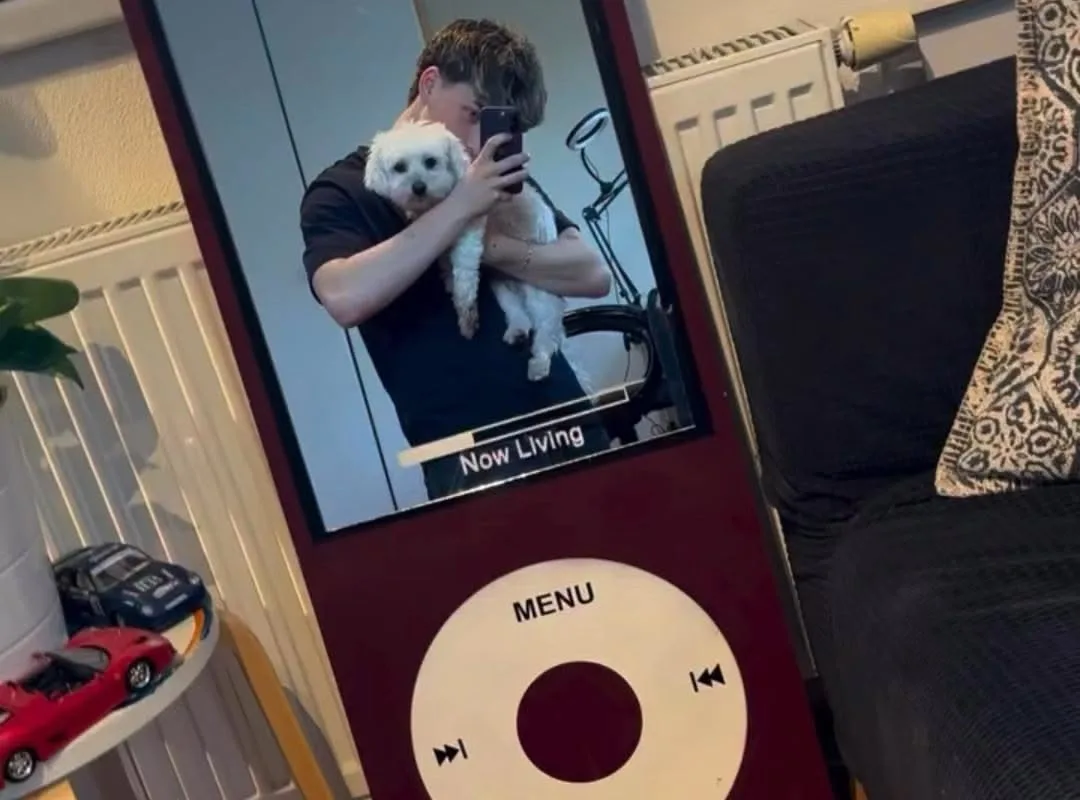
Got an old iPod gathering dust? Turn it into a stylish mirror in under an hour. This guide gives you 7 hacks to make a DIY iPod mirror that's both functional and nostalgic.
Advertisements1
- You can make a DIY iPod mirror in under an hour with basic tools.
- Use E6000 adhesive, not super glue, to avoid fogging the mirror.
- Heating the screen edges makes disassembly easy and safe.
- Clean the casing thoroughly for a crystal-clear reflection.
- Personalize with paint or decorations to match your decor.
- Let the adhesive cure for 24 hours for a durable bond.
Why an iPod Mirror? The Charm of Nostalgia
Old iPods are everywhere—thrift stores, junk drawers, forgotten boxes. Instead of letting them clutter, why not transform one into a mirror? The iconic click wheel and sleek design make a perfect frame. Plus, it's a conversation starter. I made my first iPod mirror from a 5th-gen classic, and it now sits on my vanity, reminding me of simpler times. You can do it too, with just a few tools.
Gather Your Tools: What You'll Need
Before you start, collect these: an old iPod (any model with a screen), a small mirror or mirrored acrylic sheet, a plastic card (like an old credit card), a hairdryer or heat gun, a craft knife, and strong adhesive (like E6000). Also grab some isopropyl alcohol and a microfiber cloth. I found a pack of 2×2 inch mirrors at a craft store for $3. Total cost: under $10 if you already have the iPod. A common mistake is using super glue—it fogs the mirror. Stick with E6000 or epoxy.
Step-by-Step: Disassemble and Prep
First, heat the iPod's screen edges with a hairdryer on low for about 30 seconds. This softens the adhesive. Then, slide a plastic card under the screen and gently pry it up. Work slowly to avoid cracking the glass. Once the screen is off, remove any internal components if you want a lighter mirror—but you can leave them for weight. Clean the inside of the front casing with alcohol. I learned the hard way: skipping the cleaning step leaves smudges that show through the mirror. Let it dry completely.
Cut and Fit Your Mirror
Trace the iPod's screen opening onto your mirror or mirrored acrylic. Use a craft knife to score and snap—or for acrylic, score and break. Wear gloves to avoid cuts. Test-fit the mirror; it should sit flush. If it's too thick, sand the edges slightly. For a 2×2 inch mirror, I used a glass cutter and smoothed edges with fine sandpaper. Mistake to avoid: forcing a too-large mirror—it can crack the casing. Measure twice, cut once.
Adhere the Mirror: Strong and Clean
Apply a thin bead of E6000 around the screen opening, not on the mirror itself. Press the mirror into place and hold for a minute. Let it cure for 24 hours. Why E6000? It's flexible and won't fog. I tried hot glue once—it popped off in a week. Also, avoid getting adhesive on the click wheel; it's a pain to remove. If you do, wipe with alcohol immediately.
Finishing Touches: Make It Yours
Now, personalize it. You can paint the iPod's back with spray paint (I used rose gold), add rhinestones around the click wheel, or attach a small stand. For a stand, bend a paperclip into a triangle and glue it to the back. Or use a phone stand. Let your creativity shine. One reader added a tiny LED light—brilliant for dark rooms. Just ensure the light doesn't overheat the adhesive.
Troubleshooting: Common Issues Solved
If the mirror looks cloudy, it's likely adhesive fumes. Let it cure longer in a ventilated area. If the click wheel doesn't spin, you may have glued it—gently pry and clean. If the mirror falls out, use more adhesive and clamp overnight. I had a mirror slip because I rushed the cure time. Patience pays off. Also, if your iPod won't close properly, check for obstructions like leftover screws.
The Hacks, Step by Step
- 1Heat and Remove the Screen
Use a hairdryer on low to soften adhesive for 30 seconds, then pry with a plastic card. This prevents glass cracking. - 2Clean the Casing
Wipe inside with isopropyl alcohol to remove dust and oil. This ensures the mirror adheres properly and looks clear. - 3Cut Mirror to Size
Trace the screen opening and cut mirrored acrylic or glass. Wear gloves and sand edges for safety. - 4Apply Adhesive and Attach Mirror
Use E6000 around the opening, press mirror in, and let cure 24 hours. Avoid super glue to prevent fogging. - 5Personalize Your Mirror
Paint, add rhinestones, or attach a stand. Make it unique to your style.
The best DIY projects are the ones that turn forgotten items into daily joys.
Frequently Asked Questions
What kind of mirror should I use for an iPod mirror?
Use a 2×2 inch mirrored acrylic sheet or glass. Acrylic is easier to cut and less likely to break.
How do I remove the screen without breaking it?
Heat the edges with a hairdryer for 30 seconds, then gently pry with a plastic card. Go slowly.
Can I use hot glue instead of E6000?
No, hot glue can pop off and may fog the mirror. E6000 is flexible and clear-drying.
How long does the adhesive take to dry?
E6000 needs 24 hours to fully cure. Avoid touching or moving the mirror during this time.
Will the mirror be functional if I leave the iPod's internals?
Yes, but it will be heavier. You can remove internals for a lighter mirror, but it's optional.


