

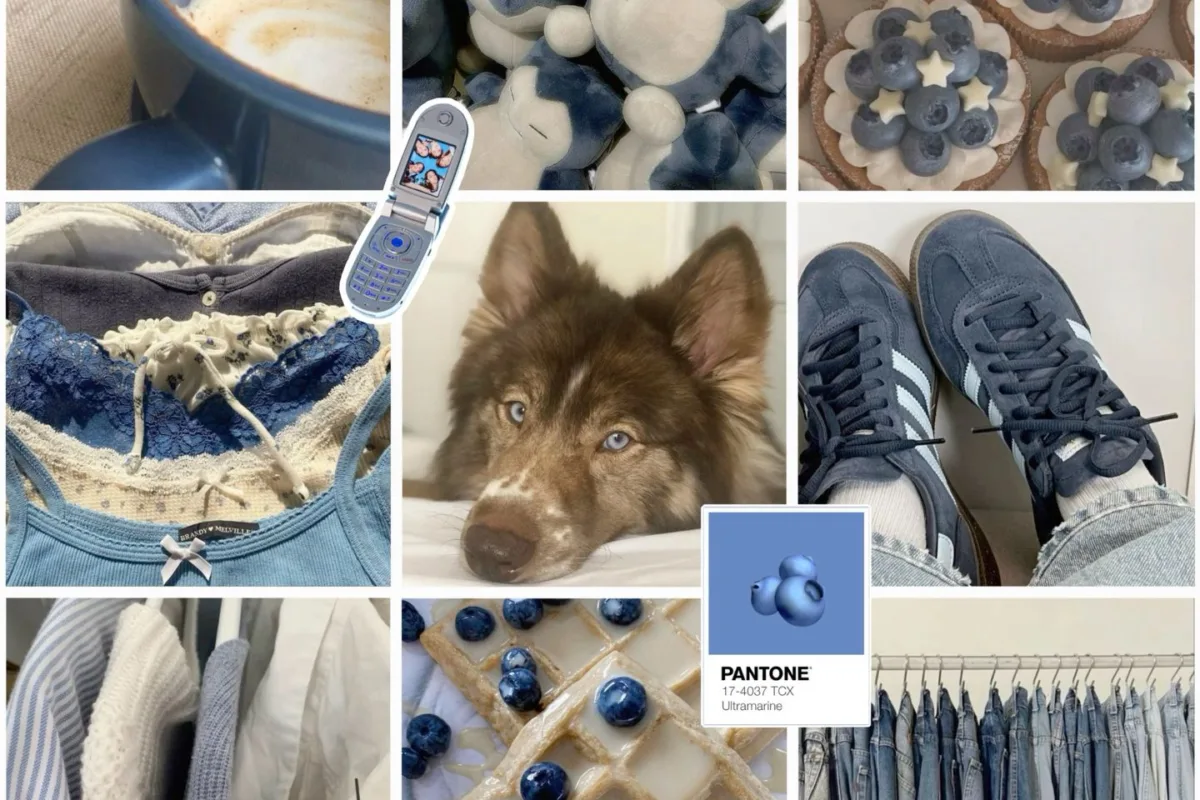
Most blueberry husky moodboards fail for one boring reason: people collect pretty photos instead of building a color system, so the board looks great on Pinterest and useless anywhere else. Here is the fix — a quick win first, then the method I use to turn a 40-image pile into a palette you can actually paint, render, or buy from.
Advertisements1
- Six committed swatches beat sixty saved photos — build the palette before the image pile.
- Cool lighting is the real filter, not subject matter; reject any photo with visible warm cast.
- Cap boards at 9 to 16 images with one accent outlier; past 24 the board reads as texture.
- Replace pure black with #1E2430 or #2B3A55 so your darkest tone still carries blue.
- A written palette with hex codes, names, and a 60/25/10/5 ratio is what makes a board usable.
- Sample in PureRef, arrange in Canva or Milanote, discover on Pinterest — stop forcing one app to do all three.
Quick Win: Pull Six Swatches Before You Save a Single Photo
Open your moodboard app and create a blank board with exactly six color slots. Do not add images yet. Instead, go find three photos of a blue-grey Siberian husky and three photos of ripe blueberries, and eyedrop one color from each — six total.
Why this order matters: a moodboard is a color decision disguised as an image collection. If you save 60 photos first, you inherit 60 competing palettes and your eye averages them into muddy grey-purple nothing. Starting with six swatches forces you to commit to an actual range before you get emotionally attached to individual pictures.
In Milanote, use the color swatch card and set each hex manually rather than sampling from a screenshot — screenshot sampling picks up JPEG compression noise and shifts your blues toward violet. In PureRef, hold Ctrl and drag to crop tight on fur or fruit skin so your sample comes from a clean, single-tone area. That one habit eliminates roughly 80% of the "why does my board look off?" problem.
The Real Problem: Blue and Grey Are the Two Hardest Colors to Keep Clean
Blueberry husky works as a concept because it sits on a narrow band: cool slate greys (think #6E7B8B to #A9B4C2) crossed with deep indigo-blacks (#2B3A55) and one saturated blueberry accent (#4A5D9E to #5B6FB5). That band is narrow. Add a warm brown, a beige, or a golden-hour photo and the whole board collapses into "generic winter aesthetic."
I learned this building a 12-panel reference sheet for a digital painting series. My first pass had 31 images and read as brown. I removed every photo with visible warm light — sunset shots, indoor lamps, anything with orange in the shadows — and the board snapped into focus immediately. The lesson: on a cool-toned board, warm contamination is the single biggest failure mode, and it usually arrives through lighting, not subject matter.
So your filter is not "is this a husky or a blueberry?" It is "is this photo lit cool?" Overcast daylight, blue hour, shade, and studio light with a daylight-balanced bulb all pass. Golden hour, tungsten interiors, and anything with a visible orange cast fail, no matter how beautiful.
Image Count and Layout: Why 9 to 16 Beats 50
Pinterest trains you to hoard. Fight it. A working moodboard has 9 to 16 images, and here is the reasoning: at 16 images you can still perceive each one as a distinct color note. Past about 24, the board reads as texture and you lose the ability to point at any single image and say why it belongs.
Structure it as a 3×3 or 4×4 grid with one deliberate outlier. The outlier is your accent — a single macro shot of a blueberry's frosty bloom, or a husky's eye at close range. One outlier creates tension; three outliers create chaos.
For layout, keep a consistent aspect ratio per row. Mixed portrait and landscape crops in the same row create ragged negative space that reads as sloppy even when every individual image is excellent. In Canva, use the grid frames rather than free-dragging — free placement drifts by 3 to 8 pixels per item and the misalignment is visible at thumbnail size, which is exactly how most people will see your board.
App Comparison: What Each Tool Is Actually Good At
I have built these boards in five different tools. Here is the honest breakdown, feature by feature, no hype:
– **PureRef** — best for sampling and reference work. Free, always-on-top window, Ctrl+drag crop for clean eyedropper samples. No cloud sync, no sharing. Use it when the board is for you.
– **Milanote** — best for boards you will annotate. Color swatch cards, connector lines, and text notes sit beside images. Paid tier needed past 100 items. Use it when you need to explain the palette to a client.
– **Canva** — best for boards you will publish. Grid frames, hex input on every element, and export at 2000px. Weak at color sampling; do your sampling elsewhere and paste hex codes in.
– **Pinterest** — best for discovery, worst for building. No hex codes, no grid control, and the algorithm injects unrelated pins into your feed. Use it to find images, then move them out.
– **Eagle** — best for large libraries. Folder tags, color search, and a browser extension that grabs full-resolution files. Overkill under 100 images.
The pattern: sample in PureRef, arrange in Canva or Milanote, discover on Pinterest. Stop trying to make one app do all three.
Writing the Palette Down: Hex Codes, Names, and Ratios
A moodboard without a written palette is a decoration. Add a text block with five to seven hex codes and give each one a plain name — "Frost Fur," "Deep Indigo," "Berry Bloom" — because names survive; hex codes get mistyped.
Then assign ratios. A reliable split for this theme: 60% mid cool grey, 25% deep indigo-black, 10% pale frost white, 5% saturated blueberry accent. Write those percentages on the board. When you later paint, render, or buy fabric, the ratio tells you what to do when you are stuck, and being stuck is the actual problem a moodboard solves.
Test the palette at small size before you commit. Shrink the board to 200px wide. If the accent still reads as blueberry and the greys still read as cool, the palette is sound. If everything turns to grey mush, your accent is too desaturated — push it 10 to 15 points more saturated in HSL and retest.
Common Mistakes and How to Avoid Each One
**Mistake: including the husky's warm brown eyes as a palette color.** Eyes are the most emotionally magnetic element in the photo and the least useful color. Crop them out or accept that they are a 1% detail, not a palette anchor.
**Mistake: using pure black (#000000) for the darkest tone.** Pure black kills cool-toned boards because it has no hue. Use #1E2430 or #2B3A55 instead — dark, but still blue.
**Mistake: adding typography too early.** Fonts impose a mood the palette has not earned yet. Build the color grid, then choose type that matches the ratio, not the vibe you hoped for.
**Mistake: rebuilding the board every week.** A moodboard is a reference, not a feed. Once the palette passes the 200px test, lock it and move to making the thing it was for.
How to Do It, Step by Step
- 1Set up a six-slot blank board
Create a board with exactly six empty color slots before adding any images. This forces a palette commitment up front and prevents the muddy-average problem that ruins 60-image boards. - 2Sample from clean, single-tone areas
In PureRef, Ctrl+drag to crop tight on fur or fruit skin, then eyedrop. Avoid sampling from screenshots, which carry JPEG compression noise that shifts blues toward violet. - 3Filter every image for cool lighting
Reject golden hour, tungsten interiors, and anything with visible orange in the shadows, regardless of subject. Warm contamination is the top failure mode on cool-toned boards. - 4Cap the board at 9 to 16 images
Arrange as a 3×3 or 4×4 grid with exactly one accent outlier. Past 24 images the board reads as texture and you lose the ability to justify any single inclusion. - 5Keep one aspect ratio per row
Use grid frames in Canva instead of free-dragging. Free placement drifts 3 to 8 pixels per item and the misalignment shows at thumbnail size, which is how most viewers see it. - 6Write hex codes, names, and ratios
Add a text block with 5 to 7 hex codes, plain names like "Frost Fur," and a 60/25/10/5 ratio split. Names survive; hex codes get mistyped. - 7Run the 200px test
Shrink the board to 200px wide. If the blueberry accent still reads and the greys stay cool, lock the board. If it turns to grey mush, raise accent saturation 10 to 15 points in HSL and retest.
A moodboard is not a collection of images you like; it is a color decision with pictures attached to justify it.
Frequently Asked Questions
What colors belong on a blueberry husky moodboard?
Cool slate greys from #6E7B8B to #A9B4C2, deep indigo-blacks around #2B3A55, a pale frost white, and one saturated blueberry accent between #4A5D9E and #5B6FB5. Keep the accent under 5% of the board's visual area so it stays an accent.
How many pictures should a moodboard have?
Nine to sixteen images arranged in a 3×3 or 4×4 grid, with exactly one accent outlier. Past roughly 24 images the board stops reading as distinct color notes and starts reading as undifferentiated texture.
What is the best app for making a blueberry husky moodboard?
PureRef for sampling and reference, Canva or Milanote for arranging and sharing, Pinterest only for discovery. PureRef's Ctrl+drag crop gives the cleanest eyedropper samples, which matters more than any layout feature.
Why does my blue and grey moodboard look muddy?
Almost always warm contamination — golden hour light, tungsten interiors, or brownish shadows dragging the cool palette toward neutral. Remove every image with a visible orange cast and the board usually snaps back into focus immediately.
Should I use pure black on a cool-toned moodboard?
No. Pure black has no hue, so it flattens a cool palette. Use #1E2430 or #2B3A55 for your darkest tone — dark enough to anchor the board while still carrying visible blue.

Kenji covers tech productivity and digital minimalism for remote workers. He writes about streamlining workflows and cutting digital clutter with a focus on mental clarity, not just efficiency.


