

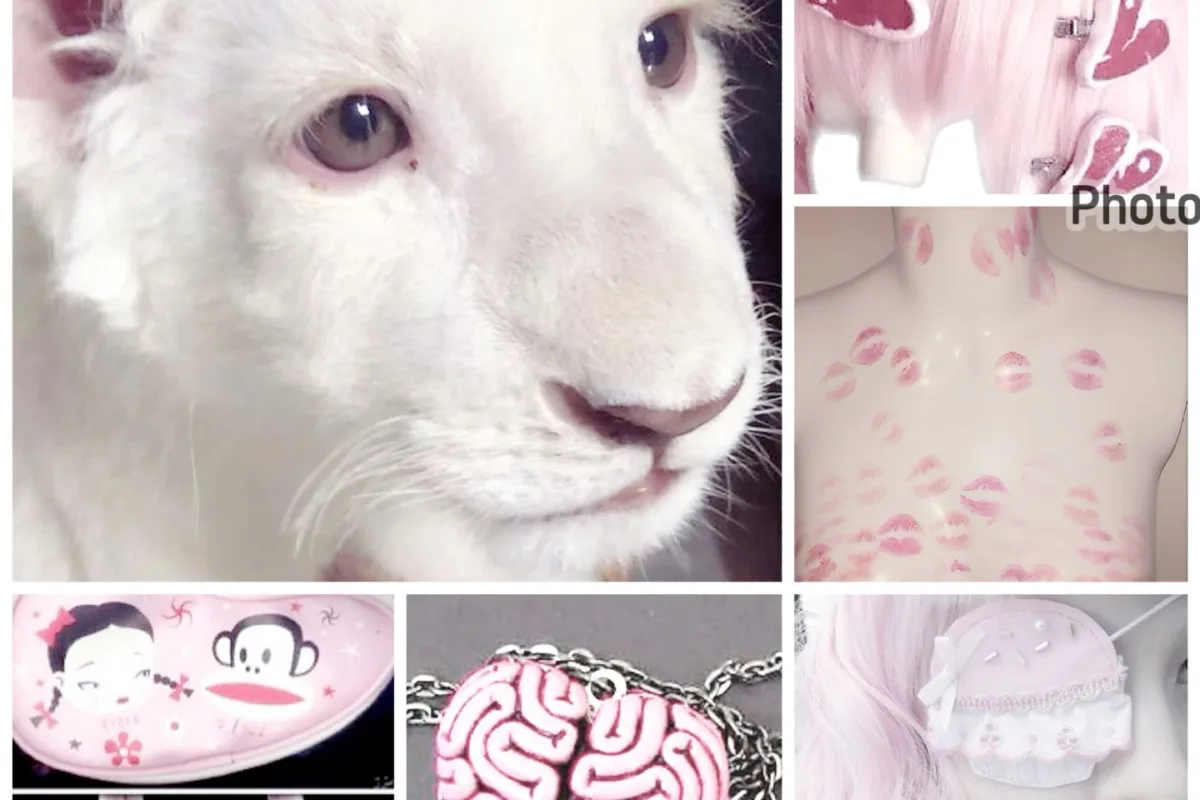
Picture this: a moonlit savanna, where a ghostly white lioness prowls, her pale fur glowing against the dark. That's the vibe we're bottling for your Halloween moodboard—and yes, it's free to use. In this guide, I'll share concrete tips to help you create a stunning albino lioness moodboard that captures mystery and magic, perfect for Pinterest or your next creative project.
Advertisements1
- An albino lioness moodboard stands out by blending elegance with eerie Halloween vibes.
- Use a palette of icy whites, silvers, and midnight blues instead of traditional orange and black.
- Incorporate textures like fur, stone, and fog to add tactile depth.
- Source free-to-use assets ethically from Unsplash, Pexels, and Pixabay, and always credit creators.
- Composition matters: use the rule of thirds and white space to guide the viewer's eye.
Why an Albino Lioness Is the Ultimate Halloween Muse
An albino lioness is a rare, ethereal creature—she's not your typical black cat or pumpkin. Her striking white coat and piercing eyes evoke a sense of otherworldly beauty, making her perfect for a Halloween moodboard that stands out. Unlike standard spooky motifs, she brings a touch of elegance and mystery, blending the eerie with the enchanting.
When building your moodboard, think of her as the centerpiece. Use high-contrast imagery: her pale form against a dark, moody background. This creates visual drama and immediately draws the eye. I've seen moodboards that pair her with elements like fog, bare branches, and a full moon—each addition deepens the narrative.
Don't just stick to photos of lionesses; incorporate illustrations, digital art, and even quotes about rarity and solitude. This mix keeps the board dynamic and gives viewers multiple entry points. Remember, a moodboard is a story, and she's your protagonist.
Color Palette: Beyond Black and Orange
Halloween doesn't have to be all orange and black. For an albino lioness theme, lean into a palette of icy whites, silvers, and deep midnight blues. These colors reflect her albinism and the nocturnal setting. Add accents of blood red or muted gold for a touch of Halloween warmth.
I recommend using a tool like Coolors to generate a cohesive palette. Start with #F5F5F5 (white smoke) as your base, #2C3E50 (dark slate) for depth, and #8E44AD (royal purple) for a mystical twist. This combination feels both regal and eerie.
Apply this palette consistently across all images. You can use a filter or overlay to unify disparate photos. For example, a subtle blue tint can make even a sunny savanna photo feel moonlit. Consistency is key to a professional-looking moodboard.
Texture and Typography: Adding Tactile Depth
A moodboard isn't just about images; textures and fonts add layers of meaning. For an albino lioness, think soft fur, rough stone, and misty fog. Incorporate texture swatches—maybe a close-up of faux fur, cracked leather, or marble. These tactile elements make the board feel immersive.
For typography, choose fonts that echo the theme: elegant serifs like Playfair Display or mysterious scripts like Cinzel. Use text sparingly—a single word like 'prowl' or 'ethereal' can anchor the mood. I often add a quote in a small, clean font to avoid clutter.
Experiment with blending modes in your design software. Overlaying a texture with 'soft light' can add subtle grain without overpowering the images. This technique gives a vintage, worn feel that suits Halloween.
Sourcing Free-to-Use (F2U) Assets Ethically
Since this moodboard is F2U, you'll want to source images and assets that are free to use without copyright issues. Stick to platforms like Unsplash, Pexels, and Pixabay for photos. For illustrations, check Creative Commons or public domain sources like Rawpixel.
Always verify the license—some sites require attribution, others don't. If you're sharing your moodboard online, include a credits section or link back to the original creators. It's not just ethical; it builds trust with your audience.
When searching, use specific keywords like 'albino lioness', 'white lion', 'moonlit savanna', and 'gothic texture'. Save assets in a dedicated folder to streamline your workflow. I keep a 'Halloween F2U' board on Pinterest for quick access.
Composition Tips: Arranging for Maximum Impact
The arrangement of your moodboard can make or break its visual appeal. Start with a focal point—usually the lioness image—placed off-center using the rule of thirds. Surround her with supporting elements that lead the eye around the board.
Group similar items together: cluster textures in one corner, typography in another. Use white space to let the images breathe. A crowded board feels chaotic; a balanced one feels intentional.
Consider the flow: your eye should travel from the lioness to a texture, then to a quote, then to a color swatch. This creates a narrative. I often sketch a rough layout on paper before digital assembly. It saves time and ensures a strong composition.
Making It Your Own: Personal Touches That Wow
Your moodboard should reflect your unique style. Add personal elements like a hand-drawn sketch of the lioness, a snippet of poetry, or a photo of your own Halloween decor. These touches make the board authentic and memorable.
Experiment with mixed media: scan a piece of lace or a dried leaf and incorporate it digitally. If you're using a platform like Canva, play with frames and shadows to add depth.
Don't be afraid to break the rules. Maybe your albino lioness is surrounded by neon lights—a juxtaposition that could be striking. The key is to have fun and let your creativity run wild. Remember, it's your board; make it uniquely yours.
How to Do It, Step by Step
- 1Gather Your F2U Assets
Search for 'albino lioness', 'white lion', 'moonlit savanna', and 'gothic texture' on Unsplash, Pexels, and Pixabay. Download at least 10-15 images and 5 textures. Why: Having a variety ensures you can mix and match without repetition. - 2Define Your Color Palette
Use Coolors to create a palette of 5 colors: icy white, silver, midnight blue, blood red, and muted gold. Why: A consistent palette unifies the board and sets the mood instantly. - 3Choose Typography
Select 2 fonts: an elegant serif for headings (e.g., Playfair Display) and a clean sans-serif for body (e.g., Lato). Why: Fonts convey tone; serif adds sophistication, sans-serif ensures readability. - 4Sketch a Layout
On paper, sketch where each element will go. Place the lioness off-center, cluster textures, and leave white space. Why: A rough plan prevents clutter and ensures visual flow. - 5Assemble Digitally
Use Canva or Photoshop to arrange your assets. Apply a subtle blue overlay to unify colors. Why: Digital tools allow easy adjustments and filters for cohesion. - 6Add Text and Quotes
Insert 1-2 short quotes or words like 'prowl' or 'ethereal' in your chosen fonts. Why: Text anchors the mood and adds a literary touch. - 7Refine and Export
Check for balance, adjust opacity of textures, and export as a high-quality PNG or JPG. Why: A polished export ensures your moodboard looks professional when shared.
Your moodboard is a visual story—let the albino lioness be the mysterious protagonist that draws everyone in.
Frequently Asked Questions
What does F2U mean in moodboards?
F2U stands for 'free to use', meaning the assets or the moodboard itself can be used without payment. However, always check individual licenses for attribution requirements.
Where can I find free albino lioness images?
You can find them on stock photo sites like Unsplash, Pexels, and Pixabay. Search for 'white lion' or 'albino lioness' and filter by free license.
How do I make my Halloween moodboard unique?
Add personal touches like hand-drawn elements, original poetry, or unconventional color palettes. Mixing textures and typography also helps your board stand out.
Can I use this moodboard for commercial purposes?
It depends on the licenses of the individual assets. If all assets are free for commercial use, then yes. Otherwise, you may need to replace some elements.
What tools can I use to create a moodboard?
Canva, Adobe Photoshop, and even Pinterest's collage feature are great options. Canva is user-friendly and offers free templates.

Priya explores creative writing prompts and storytelling techniques for aspiring authors. She shares exercises to spark imagination and build narrative confidence, drawn from her own writing practice.


