

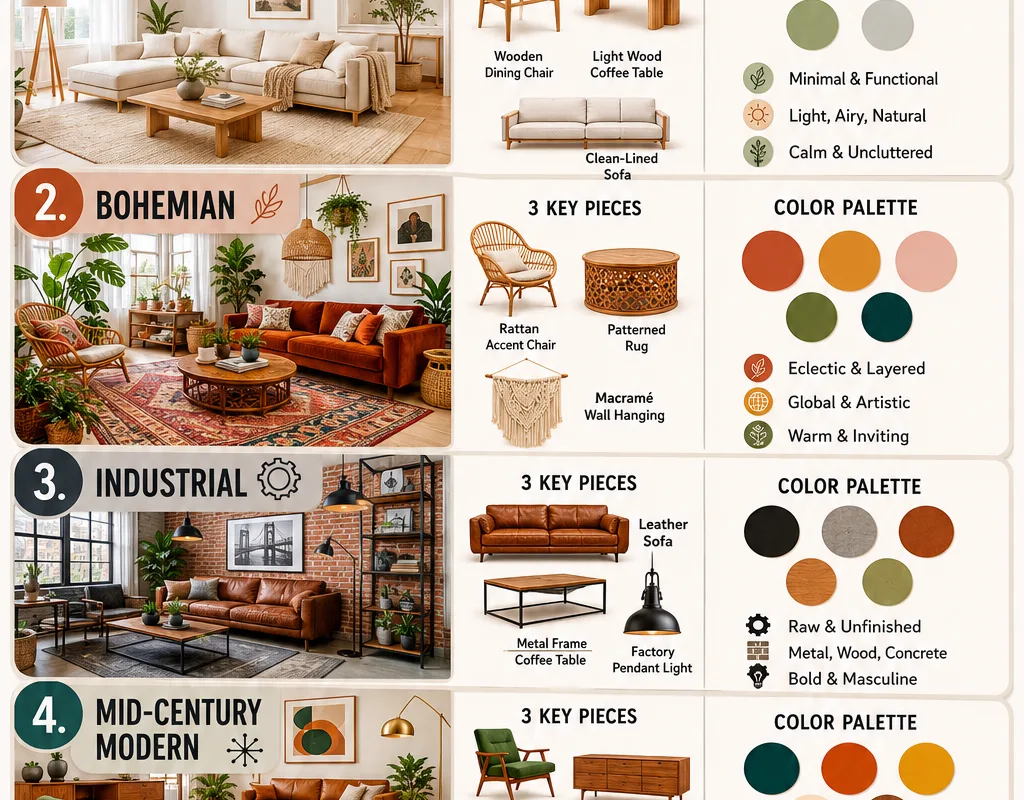
Most people decorate a room the way they buy a car: they walk in, see something shiny, and sign. Then they live with the mistake for years. A room style guide infographic fixes that. It’s a visual cheat sheet that tells you which colors, proportions, and furniture shapes actually belong together — before you spend a cent. The problem? Everyone shares the same five Pinterest graphics. Below are 17 places to find genuinely useful room style guide infographics, from free generators to design systems most people have never opened.
Advertisements1
Table of Contents(Click to Toggle)
Why a Room Style Guide Infographic Beats Guessing
Here’s the analogy I use: decorating without a style guide is like cooking without a recipe. You have flour, eggs, and sugar — all fine ingredients — but dump them together at random and you get a mess, not a cake. A room style guide infographic is the recipe. It fixes the ratio.
Designers don’t guess. They follow systems: a defined palette, a rule of thirds for furniture placement, and a consistent material story. An infographic compresses that system into one glanceable image. The catch is that most of what circulates online is recycled fluff — pretty squares with no actual rules. What you want is a source that gives you specific numbers: color codes, proportion percentages, and spacing guidance you can act on today.
Below, I’ve split the list between generators (where you build your own guide) and curated libraries (where you find pre-made ones). Every entry is a real tool or publication, and I’ll flag the limitations too, because nothing here is magic.
1. Canva : The fastest way to build your own style guide graphic
What it is: A free design platform with thousands of infographic templates, including interior mood boards and style sheets.
Category: Design generator
Why it stands out: Search “interior design infographic” and you get editable layouts with color swatch blocks, furniture icons, and text hierarchy already set. You can drop in your own palette hex codes and export a clean PNG in minutes.
Best for: Beginners who want a shareable one-page guide without learning design software. Limitation: the best templates sit behind Canva Pro.
2. Coolors : Lock a room palette before you buy a single cushion
What it is: A color palette generator that spits out five-color combinations in seconds.
Category: Color tool
Why it stands out: Hit the spacebar and it generates a new palette instantly. You can extract colors from a photo of a rug you already own, then export the hex codes as a shareable image — effectively a mini style guide infographic.
Best for: Anyone stuck on “what colors go together.” Set the generator to analogous mode for calm rooms, complementary for bold ones.
3. The Spruce : Plain-English guides that read like infographics
What it is: A home publication with hundreds of style breakdowns, from Scandinavian to maximalist.
Category: Editorial library
Why it stands out: Each style guide lists the defining elements — wood tones, lighting, textiles — in scannable bullet form, and many articles embed printable graphics. It’s the research layer before you design anything.
Best for: Renters who need to name their style before shopping. Limitation: it’s text-heavy, so pair it with a visual tool.
4. Houzz : See real rooms that match each style tag
What it is: A massive photo database of real interiors, filterable by style, room, and budget.
Category: Inspiration platform
Why it stands out: Every photo carries tags like “mid-century modern” or “coastal,” so you can verify whether your chosen style guide actually looks right in a lived-in space, not just a render.
Best for: Validating a palette against real photography before committing. The saved-ideabook feature works like a personal mood board.
5. Pinterest : Where the original pin came from — use it properly
What it is: The visual search engine most people already use for room ideas.
Category: Discovery platform
Why it stands out: The trick is the search operator. Type “bedroom style guide infographic” instead of “bedroom ideas” and you get graphic cheat sheets rather than random photos. Use the visual search crop tool on any image to find matching guides.
Best for: Rapid collection. Limitation: quality varies wildly — verify colors against a real tool.
6. Adobe Express : Free infographic layouts with pro typography
What it is: Adobe’s browser-based design tool with a dedicated infographic category.
Category: Design generator
Why it stands out: The type pairing is genuinely better than most free tools, which matters because a style guide lives or dies on legibility. You can start from a template, swap the palette, and download a print-ready PDF.
Best for: Anyone making a guide they’ll actually print and pin to the wall.
7. Design Seeds : Palettes pulled from real photographs
What it is: A long-running archive of color palettes extracted from nature and everyday scenes.
Category: Color inspiration
Why it stands out: Each entry shows the source photo beside its swatch strip — which is exactly the layout of a good style guide infographic. It teaches you why a palette works by showing the original subject.
Best for: People who want organic, non-obvious color stories. Limitation: it’s inspiration, not a shopping list.
8. Figma : Build a reusable style system, not a one-off graphic
What it is: A collaborative design tool with free community files.
Category: Design system tool
Why it stands out: Search the community for “interior mood board” and you’ll find editable files with color styles and text styles built in. Change one swatch and it updates everywhere — the same logic designers use on real projects.
Best for: Multi-room projects where consistency matters. Slight learning curve if you’ve never used a layer panel.
9. Apartment Therapy : Style rules explained with real constraints
What it is: A home site focused on small spaces and real budgets.
Category: Editorial library
Why it stands out: Their house tours consistently show how a style guide bends around a 400-square-foot apartment. That’s the part infographics usually skip: what to cut when space runs out.
Best for: Renters and small-space dwellers who need practical edits, not theory.
10. Roomstyler : Turn a 2D guide into a 3D test room
What it is: A free browser-based 3D room planner with a large furniture catalog.
Category: Planning tool
Why it stands out: You can apply your palette to actual walls and floors and walk the camera around. It’s the reality check that stops a beautiful infographic from becoming an ugly room.
Best for: Testing layout and proportion before buying. Runs best on desktop.
11. Behance : Designer-grade interior graphics you can study
What it is: Adobe’s portfolio network for professional creatives.
Category: Portfolio gallery
Why it stands out: Search “interior infographic” and you’ll find full case studies showing the grid, spacing, and color logic behind polished guides. Even if you never download anything, studying three of these upgrades your own layout instincts.
Best for: People who want to make a guide that doesn’t look like a template.
12. Venngage : Infographic-first templates with chart blocks
What it is: A dedicated infographic builder with a strong template library.
Category: Design generator
Why it stands out: Unlike general design tools, Venngage is built around data blocks — pie charts, comparison grids, icon rows. That structure suits a style guide that needs to show proportions, like 60 percent neutral, 30 percent secondary, 10 percent accent.
Best for: Guides that need to communicate ratios, not just swatches. Free tier is limited.
13. Remodelista : The ten-elements format done properly
What it is: An interiors site known for tightly edited style breakdowns.
Category: Editorial library
Why it stands out: Their recurring “10 Easy Pieces” format is essentially a text infographic — a fixed number of defining objects per style, each with a reason. It’s a masterclass in editing, which is the hardest part of any style guide.
Best for: Anyone who over-buys. This teaches subtraction.
14. Dribbble : Micro-inspiration for layout and color blocks
What it is: A visual showcase for designers, heavy on UI but rich in color work.
Category: Inspiration gallery
Why it stands out: Use it to steal structure, not content. Search “color palette” or “moodboard” and you’ll see how professionals group swatches, label tones, and create visual rhythm — all directly transferable to a room guide.
Best for: Layout ideas when your own graphic looks flat. Not a home-specific source.
15. Snappa : Quick graphics without a design degree
What it is: A simplified graphic editor aimed at non-designers.
Category: Design generator
Why it stands out: Fewer options than Canva, which is the point — you can’t get lost. It includes preset dimensions for social posts, so your finished style guide drops straight into Pinterest or Instagram without resizing.
Best for: Fast, clean output. Limited free downloads per month.
16. ArchDaily : Learn proportion from actual architecture
What it is: A global architecture publication with detailed project write-ups.
Category: Reference library
Why it stands out: Style guides obsess over color and forget scale. ArchDaily’s plans and sections show how ceiling height, window placement, and furniture footprint interact — the invisible rules behind rooms that simply feel right.
Best for: Renovators and anyone dealing with awkward proportions. Dense reading.
17. Piktochart : The most guided infographic workflow
What it is: A template-driven infographic maker with a step-by-step editor.
Category: Design generator
Why it stands out: It walks you from template to export in a linear flow, which suits a style guide perfectly: pick a layout, add your palette and four rules, publish. It also exports to PNG and PDF in one click.
Best for: First-timers who want a finished graphic in under an hour.
Bonus Mentions
Color Matters : The science behind why palettes work
An educational site on color perception and psychology. Useful when you want to understand contrast and harmony rather than just copy a swatch strip.
Dezeen : Contemporary interior trends worth knowing
A design magazine covering current movements. Good for spotting what’s emerging before it floods every infographic on Pinterest.
Design Sponge : Archived style guides with personality
A classic interiors blog with deep archives. Its “sneak peek” format shows how real people apply a style consistently across rooms.
COLOURlovers : Community palettes with naming and voting
A community where users submit and rate palettes. Handy for finding combinations you’d never generate yourself.
Home Stratosphere : Diagram-heavy room guides
Publishes visual guides on room dimensions and layout. Closest thing to a technical manual for interior spacing.
The Internet’s Best-Kept Style Secrets (So Far)
Here’s the honest takeaway: a room style guide infographic is only as good as the constraints behind it. A pretty graphic with no numbers is decoration. A useful one tells you the palette hex codes, the 60-30-10 split, and the spacing rule you should follow. Use the generators above to build your own, and the libraries to sanity-check it against real rooms.
My specific advice: start with Coolors to lock five colors, test them in Roomstyler, then build the final one-page guide in Canva or Piktochart. That’s a weekend project, not a renovation. And skip anything that promises a “perfect room” without showing you a single measurement — that’s marketing, not design.
Stay sharp, stay private.
Which one of these did you already know — and which tool are you trying first? Drop your own hidden gem in the comments.

Lucas covers technology and digital privacy, explaining complex topics in plain language for non-techies. He focuses on how everyday people can protect their data without being paranoid.


