

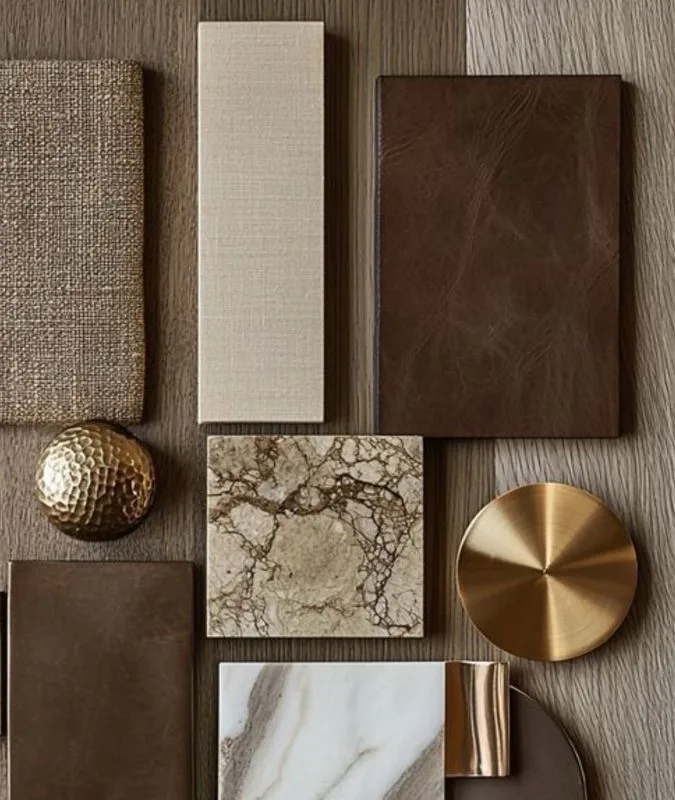
Ever feel like you have a hundred ideas in your head but no way to make them look good together? That is exactly what a moodboard is for. It is a simple collection of images, colors, textures, and words that captures a feeling before you commit to anything.
Advertisements1
Maybe you are planning a bedroom refresh. You keep saving photos of warm wood tones and soft linen curtains. A moodboard turns those scattered saves into one clear direction. It helps you see the big picture at a glance.
The good news is you do not need design school or expensive software. There are wonderful free and low-cost tools out there that make moodboarding easy and even fun. Some are brand new. Some have been quietly sitting online for years, waiting to be found.
Below are 17 moodboard makers and visual inspiration tools worth trying. I have grouped them by feel, so you can jump straight to the one that matches how you like to work. Take your time. There is no wrong way to start.
Table of Contents(Click to Toggle)
Why a Moodboard Changes How You Create
A moodboard is not decoration. It is a decision-making tool. When you gather your references in one place, your brain stops juggling and starts connecting.
Say you want to rebrand a small candle business. Instead of scrolling endlessly, you pin five photos of amber glass, three font samples, and a color swatch. Suddenly you can see if the vibe is cozy or clinical. That clarity saves you hours.
Moodboards also help you communicate. If you are working with a friend, a contractor, or a client, a board says what words cannot. Everyone sees the same vision.
The tools below make this process easier. Some are built for solo dreaming. Others are made for teams. All of them are worth a look.
17 Moodboard Tools for Visual Inspiration
1. Milanote : A visual board that feels like a real pinboard
What it is: A drag-and-drop workspace for images, notes, links, and color swatches.
Category: Visual planning and moodboarding
Why it stands out:
- You can arrange items freely on an infinite canvas, just like a physical corkboard.
- It offers a free plan with up to 100 notes, which is plenty for a small project.
- The interface is calm and uncluttered, so you focus on the images, not the buttons.
Best for: Writers, interior planners, and anyone who thinks better with a messy-but-organized board.
2. Are.na : A quiet, ad-free space for collecting ideas
What it is: A platform where you build channels of images, text, and links around any theme.
Category: Research and visual curation
Why it stands out:
- No algorithm, no likes, no ads. It is just you and your references.
- You can connect blocks between channels, which reveals unexpected relationships.
- It has a strong community of designers, researchers, and artists sharing public channels.
Best for: Deep thinkers who want a slow, thoughtful way to collect inspiration.
3. Savee : A fast, beautiful image saver for creatives
What it is: A bookmarking tool made specifically for visual people.
Category: Image bookmarking and moodboards
Why it stands out:
- You can save images from any website with one click using the browser extension.
- Your saves appear in a clean grid that is easy to scan and search.
- It automatically detects colors and tags, which helps you find things later.
Best for: Photographers, art directors, and anyone who saves dozens of images a day.
4. Cosmos : A discovery engine for visual inspiration
What it is: A platform that blends moodboarding with a feed of curated creative work.
Category: Visual discovery and moodboards
Why it stands out:
- The feed is curated by real people, not just algorithms, so the quality stays high.
- You can create clusters of images that feel like mini moodboards.
- It is invite-only, which keeps the community small and focused.
Best for: Designers who want to discover new aesthetics while building their own boards.
5. Pinterest : The classic starting point for any moodboard
What it is: A visual search engine and pinboard platform used by millions.
Category: Social bookmarking and inspiration
Why it stands out:
- It has an enormous library of images across every imaginable topic.
- You can create secret boards for private projects and collaborative boards for teams.
- The visual search tool lets you crop any part of an image to find similar looks.
Best for: Beginners who want a free, familiar place to start collecting ideas.
6. Canva : A design tool with built-in moodboard templates
What it is: An online design platform with drag-and-drop editing and thousands of templates.
Category: Graphic design and moodboarding
Why it stands out:
- It offers ready-made moodboard templates, so you do not start from a blank page.
- You can add text, stickers, and shapes to annotate your images.
- The free version is generous and includes access to millions of stock photos.
Best for: Small business owners and students who need a polished board fast.
7. Figma : A collaborative canvas for design teams
What it is: A browser-based design tool that supports real-time collaboration.
Category: UI design and visual collaboration
Why it stands out:
- Multiple people can move images and add comments at the same time.
- You can turn any frame into a moodboard and share a view-only link.
- It integrates with plugins that pull images from Unsplash and other libraries.
Best for: Product teams and freelancers who already use Figma for design work.
8. PureRef : A lightweight reference viewer for your desktop
What it is: A small app that lets you arrange reference images on a always-on-top canvas.
Category: Desktop reference and moodboarding
Why it stands out:
- It stays on top of other windows, so you can paint or model while looking at your board.
- You can zoom, rotate, and crop images without leaving the app.
- It is free to download and works on Windows, Mac, and Linux.
Best for: Illustrators, 3D artists, and anyone who needs references while working.
9. Miro : A whiteboard that doubles as a moodboard
What it is: An online collaborative whiteboard with sticky notes, shapes, and frames.
Category: Team collaboration and visual planning
Why it stands out:
- You can drag images onto the board and group them into frames.
- It includes voting and commenting features for team feedback.
- The free plan allows unlimited boards with up to three editors.
Best for: Remote teams running brainstorming sessions or brand workshops.
10. Coolors : A color palette generator that pairs with moodboards
What it is: A fast tool for creating, saving, and sharing color schemes.
Category: Color palette and moodboarding
Why it stands out:
- You can generate palettes from a photo you upload, which keeps colors consistent.
- It shows contrast checks so your text stays readable.
- You can export palettes as PNG, PDF, or code snippets.
Best for: Web designers and crafters who need a reliable color story.
11. Adobe Color : A classic color wheel for building harmonies
What it is: A free web app for exploring color relationships and themes.
Category: Color inspiration and moodboarding
Why it stands out:
- It offers rules like analogous, monochromatic, and triadic to guide your choices.
- You can extract a theme from any image you upload.
- It connects to Adobe Creative Cloud for easy use in other apps.
Best for: Artists and designers who want to understand why certain colors work together.
12. Behance : A portfolio site that doubles as inspiration
What it is: A showcase of creative work from designers, illustrators, and photographers.
Category: Creative portfolio and inspiration
Why it stands out:
- You can browse full projects, not just single images, to see how a moodboard becomes a final piece.
- It lets you save projects to collections for later reference.
- It is owned by Adobe, so it is stable and well-maintained.
Best for: Designers looking for professional-level references and case studies.
13. Dribbble : A stream of polished design shots
What it is: A community where designers share small snapshots of their work.
Category: Design inspiration and networking
Why it stands out:
- The shots are high quality and often include color palettes and typography details.
- You can follow specific designers or tags to keep your feed relevant.
- It is a good place to see trends before they hit the mainstream.
Best for: UI and graphic designers who want quick, visual inspiration.
14. Niice : A moodboard tool built for brand projects
What it is: A private workspace for gathering images, colors, and notes into boards.
Category: Brand moodboarding and collaboration
Why it stands out:
- You can create multiple boards for different clients or projects.
- It includes a built-in search across several design sources.
- You can share boards with a link, no account needed for viewers.
Best for: Freelancers and agencies managing brand identities.
15. Sampleboard : A simple online moodboard maker
What it is: A web app for creating presentation-ready moodboards.
Category: Moodboard creation and presentation
Why it stands out:
- It has a clean interface with drag-and-drop image placement.
- You can add text boxes and color swatches to explain your choices.
- It offers a free trial so you can test it before committing.
Best for: Interior designers and event planners who present ideas to clients.
16. GoMoodboard : A no-fuss tool for quick visual boards
What it is: A straightforward online moodboard builder with a focus on speed.
Category: Moodboard creation
Why it stands out:
- You can upload images or pull them from a URL in seconds.
- The layout tools are simple, so you do not get lost in settings.
- It works well on tablets, which is handy for in-person client meetings.
Best for: Beginners and anyone who wants a board done in under ten minutes.
17. Notion : A flexible workspace you can turn into a moodboard
What it is: An all-in-one tool for notes, databases, and visual layouts.
Category: Productivity and moodboarding
Why it stands out:
- You can create a gallery view of images and add captions or tags.
- It supports embedding from YouTube, Figma, and other tools.
- The free plan is robust for personal use.
Best for: People who already use Notion and want to keep everything in one place.
Bonus: Eagle : A desktop image organizer for large libraries
What it is: A paid app for managing thousands of reference images.
Category: Image management
Why it stands out:
- It supports tags, folders, and smart filters for fast searching.
- You can save images from the web with a browser extension.
- It works offline, which is great for travel.
Best for: Collectors who need a serious library, not just a single board.
Bonus: Unsplash : Free high-resolution photos for your boards
What it is: A library of free, high-quality stock photos.
Category: Stock photography
Why it stands out:
- All photos are free to use, even commercially.
- The search filters by color and orientation, which saves time.
- It is a go-to source for filling gaps in your moodboard.
Best for: Anyone who needs placeholder images or extra texture shots.
Bonus: Pexels : Another free stock photo site with a friendly license
What it is: A collection of free photos and videos shared by creators.
Category: Stock photography
Why it stands out:
- It has a wide range of lifestyle and interior images.
- The license is simple and allows modification.
- It includes short videos, which can add motion to a digital board.
Best for: Bloggers and social media creators building visual themes.
Bonus: Fontpair : A simple way to choose fonts that work together
What it is: A website that suggests font combinations for headings and body text.
Category: Typography inspiration
Why it stands out:
- It shows live previews of each pairing, so you can see the vibe instantly.
- All suggested fonts are free from Google Fonts.
- It helps you add a typography layer to your moodboard.
Best for: Designers who want their board to include a type direction.
Bonus: Color Hunt : A curated collection of color palettes
What it is: A simple site that shares four-color palettes from the community.
Category: Color inspiration
Why it stands out:
- You can browse by popularity or newness.
- Each palette is easy to copy as hex codes.
- It is ad-free and loads fast.
Best for: Quick color decisions when you are short on time.
The Internet’s Best-Kept Moodboard Secrets
You now have 17 tools and five bonus mentions to explore. That is a lot, I know. So here is my advice: pick one. Just one. Try it with a small project this week.
Maybe you start a board for your dream reading nook. You add three photos, two color swatches, and a note about how you want it to feel. That is a complete moodboard. It does not need to be perfect.
The magic happens when you stop collecting and start arranging. That is when your eye learns what you actually like. And that is when your projects start to feel like you.
So which tool caught your attention? Or do you already have a favorite I missed? Tell me in the comments. I read every one, and I am always looking for new hidden gems to try.
Here’s to small steps, big impact.

Maya writes about sustainable living and zero-waste swaps for busy families. She focuses on small, actionable changes that fit into real life without judgment or guilt.


