

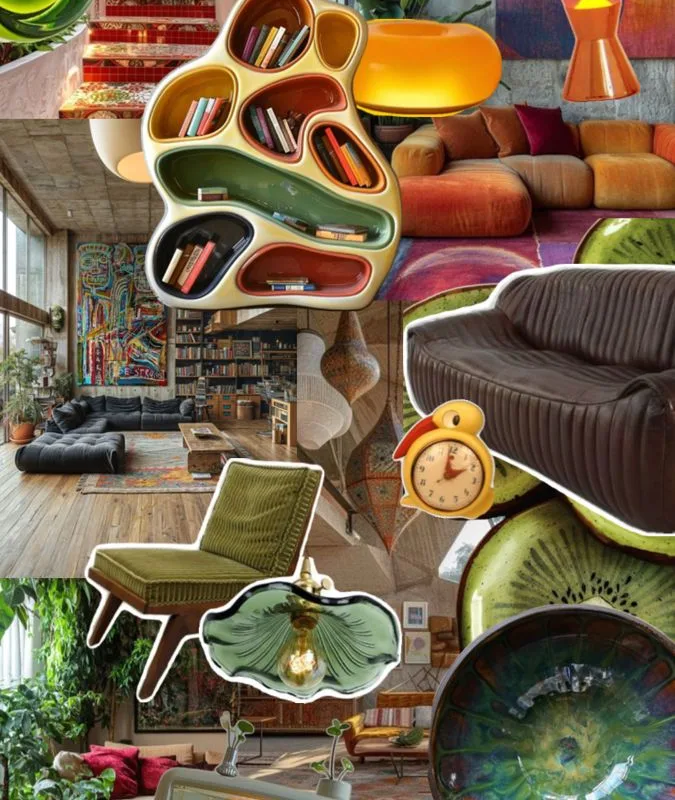
When I was in eleventh grade, my art teacher asked us to create a moodboard for a design project. I had no idea where to start. I spent hours cutting out magazine pages and gluing them onto a poster board, and honestly? It looked messy and unfocused. That night, I went online and discovered a whole world of digital moodboard tools that would have saved me so much time and made my project look professional. I wish someone had handed me a list like this back then.
Advertisements1
Whether you are working on a school art project, a design class assignment, or a group presentation, a moodboard helps you collect colors, textures, images, and ideas in one place. It turns scattered thoughts into a clear visual direction. The tools below are the ones I have personally tested or seen students use with great results. Some are free, some have student plans, and all of them are beginner-friendly.
You do not need to be a professional designer to make a moodboard that impresses your teacher. You just need the right tool and a little curiosity. Let us dive in.
Table of Contents(Click to Toggle)
Why Moodboards Matter for School Projects
A moodboard is more than a pretty collage. It is a thinking tool. When you gather images, colors, and textures that represent a feeling or concept, you give your brain a visual language to work with. For school projects, this means you can explain your creative choices more clearly and your teacher can see the thought process behind your work.
I remember a classmate who used a moodboard for a history presentation about the 1920s. Instead of just listing facts, she showed a board with Art Deco patterns, vintage car photos, and jazz album covers. The class was captivated. Her grade reflected that effort. A moodboard helped her tell a story, not just deliver information.
Digital moodboards have another advantage: they are easy to share, edit, and submit online. No glue sticks required. You can work on them from your phone, laptop, or school computer. And many tools let you collaborate with classmates in real time, which is perfect for group projects.
Now, let us look at the best tools and ideas to create your own moodboard for school. I have organized them so you can find the right fit whether you are a total beginner or someone who wants more advanced features.
1. Milanote : The all-in-one visual workspace for students
What it is: A digital canvas where you can pin images, notes, links, and files in a flexible board layout.
Category: Visual organization and moodboarding
Why it stands out:
- Drag-and-drop interface feels like arranging sticky notes on a wall.
- Free plan includes unlimited boards and 100 items, which is plenty for a school project.
- You can embed YouTube videos and Spotify playlists to capture the full mood.
- Works on web and mobile, so you can add ideas on the go.
Best for: Students who want a dedicated moodboard tool without a steep learning curve.
2. Canva : Templates and drag-and-drop design for quick boards
What it is: A graphic design platform with thousands of templates, including moodboard layouts.
Category: Design and presentation
Why it stands out:
- Canva for Education is free for students and teachers, unlocking premium features.
- Search for “moodboard” and you will find ready-made grids and collages.
- Add text, stickers, and frames to give your board a polished look.
- Export as PDF or PNG for easy submission.
Best for: Students who need a fast, polished result for a class presentation.
3. Pinterest : The classic inspiration engine for visual research
What it is: A visual discovery platform where you save images to boards.
Category: Inspiration and research
Why it stands out:
- Endless supply of images on any topic, from fashion to architecture.
- Secret boards let you work privately until you are ready to share.
- You can create sections within a board to organize different themes.
- The “More like this” feature helps you find related visuals quickly.
Best for: Initial idea gathering before you commit to a specific direction.
4. Figma : Collaborative design tool with a free education plan
What it is: A browser-based design tool for creating interfaces, graphics, and moodboards.
Category: Professional design and collaboration
Why it stands out:
- Figma for Education is free for students and educators.
- Real-time collaboration means your group can work on the same board simultaneously.
- Use frames, grids, and auto-layout to keep your moodboard tidy.
- Commenting feature is great for getting feedback from teachers.
Best for: Design students and group projects that need version control.
5. Adobe Express : Quick, free moodboards with Adobe polish
What it is: A simplified version of Adobe’s creative tools, with templates for moodboards.
Category: Design and graphics
Why it stands out:
- Free plan includes thousands of templates and Adobe Fonts.
- Remove backgrounds from images with one click.
- Integrates with Adobe Stock for high-quality photos.
- Easy to resize your board for different formats (poster, slide, social).
Best for: Students who want professional-looking results without learning complex software.
6. Miro : Infinite canvas for brainstorming and visual mapping
What it is: An online whiteboard platform for collaboration and visual thinking.
Category: Collaboration and brainstorming
Why it stands out:
- Free plan allows up to three editable boards.
- Sticky notes, shapes, and arrows help you map out ideas around your moodboard.
- Timer and voting features are great for group decision-making.
- Integrates with Google Drive, Dropbox, and more.
Best for: Group projects where you need to brainstorm and organize together.
7. Padlet : Digital bulletin board for class collaboration
What it is: A virtual wall where you and classmates can post notes, images, and links.
Category: Education and collaboration
Why it stands out:
- Free plan includes three padlets, enough for a semester.
- Teachers can create a padlet for the whole class to contribute to.
- Multiple layout options: wall, grid, stream, and shelf.
- Moderation settings keep the board focused and appropriate.
Best for: Classroom activities where everyone adds their own inspiration.
8. Google Slides : The familiar tool you already have
What it is: Google’s presentation software, which can double as a moodboard canvas.
Category: Presentation and basic design
Why it stands out:
- Free with any Google account.
- Insert images, shapes, and text boxes directly onto a slide.
- Real-time collaboration and commenting.
- Easy to present your moodboard to the class.
Best for: Students who want a no-fuss option that works on any school computer.
9. Niice : A dedicated moodboard tool for creatives
What it is: A platform to create and share moodboards with images, colors, and notes.
Category: Design inspiration and moodboarding
Why it stands out:
- Clean, distraction-free interface.
- Upload your own images or search within the app.
- Collaborate with classmates on private boards.
- Free plan available for personal use.
Best for: Students who want a focused moodboard tool without extra features.
10. Dribbble : Discover design trends and save shots
What it is: A community of designers sharing their work, often used for inspiration.
Category: Inspiration and portfolio
Why it stands out:
- High-quality, professional design work to reference.
- You can create buckets (collections) to save shots for later.
- Search by color, tag, or keyword.
- Great for finding modern color palettes and layouts.
Best for: Design students looking for contemporary visual references.
11. Behance : Portfolio platform with project-based inspiration
What it is: Adobe’s platform for showcasing creative projects across disciplines.
Category: Inspiration and research
Why it stands out:
- Full project case studies show how moodboards fit into a larger design process.
- Filter by field: graphic design, illustration, photography, and more.
- Save projects to collections for easy reference.
- Free to browse and create a basic portfolio.
Best for: Students who want to see how professionals use moodboards in real projects.
12. Coolors : Generate and save color palettes for your board
What it is: A fast color palette generator and library.
Category: Color tools
Why it stands out:
- Press the spacebar to generate new palettes instantly.
- Save palettes and export as PNG or code.
- Explore trending palettes from other users.
- Free for basic use, with a pro option for advanced features.
Best for: Nailing down a cohesive color scheme for your moodboard.
13. Unsplash : Free high-resolution photos for your moodboard
What it is: A library of free, high-quality stock photos.
Category: Image sourcing
Why it stands out:
- All photos are free to use, even for school projects.
- Curated collections make it easy to find a specific vibe.
- Search by keyword, color, or orientation.
- No attribution required, though it is appreciated.
Best for: Finding beautiful, license-free images to populate your board.
14. Pexels : Another great source for free stock photos and videos
What it is: A free stock photo and video platform with a wide selection.
Category: Image sourcing
Why it stands out:
- Thousands of free images, including many with a more casual, authentic feel.
- Videos can add motion to digital moodboards.
- Simple search and filter options.
- Free to use for educational purposes.
Best for: Students who need a variety of images, including video clips.
15. Procreate : Draw and collage your own moodboard on iPad
What it is: A powerful digital painting app for iPad.
Category: Digital art and illustration
Why it stands out:
- Create custom illustrations, textures, and hand-lettered elements.
- Import photos and arrange them on a canvas.
- One-time purchase, no subscription.
- Thousands of free brushes online.
Best for: Art students who want a hands-on, artistic moodboard.
16. Trello : Organize your moodboard research with boards and cards
What it is: A kanban-style project management tool.
Category: Organization and planning
Why it stands out:
- Create lists for different themes or project phases.
- Attach images, links, and files to cards.
- Drag and drop to reorder ideas.
- Free plan is generous for students.
Best for: Students who like to plan their moodboard step by step.
17. Notion : All-in-one workspace for notes and visual boards
What it is: A flexible tool for notes, databases, and embedded media.
Category: Productivity and organization
Why it stands out:
- Free for students with a school email.
- Create a page with columns, images, and embedded links.
- Gallery view turns a database into a visual board.
- Sync across devices.
Best for: Students who want to keep their moodboard alongside research notes.
18. Milanote Student Templates : Pre-made boards for common school projects
What it is: A collection of ready-to-use templates specifically for students.
Category: Templates and education
Why it stands out:
- Templates for essays, research papers, and creative projects.
- Each template includes prompts and structure to get you started.
- Free to use with a Milanote account.
- Customizable to fit your specific assignment.
Best for: Students who feel stuck and need a starting point.
Bonus: Are.na : A quiet, ad-free platform for collecting ideas
What it is: A minimalist platform for saving and connecting content.
Category: Inspiration and research
Why it stands out:
- No likes, no ads, just pure content.
- Create channels for different themes.
- Connect ideas visually with blocks.
- Free plan available.
Best for: Students who want a distraction-free inspiration space.
Bonus: Savee : A visual bookmarking tool for creatives
What it is: A platform to save and organize images from around the web.
Category: Inspiration and bookmarking
Why it stands out:
- Browser extension makes saving images quick.
- Boards and tags keep everything organized.
- Discover trending content from other users.
- Free plan with basic features.
Best for: Students who find inspiration while browsing and want to save it easily.
Bonus: Cosmos : A modern moodboard app for visual discovery
What it is: An app that helps you collect and arrange images into beautiful boards.
Category: Moodboarding and inspiration
Why it stands out:
- Elegant, intuitive interface.
- Smart recommendations based on your saves.
- Collaborate with friends on shared boards.
- Free to use with optional premium features.
Best for: Students who want a visually stunning moodboard with minimal effort.
Bonus: Evernote : Capture notes, images, and web clippings in one place
What it is: A note-taking app that can also serve as a moodboard repository.
Category: Note-taking and organization
Why it stands out:
- Web clipper saves articles and images directly to notebooks.
- Search text within images (OCR).
- Sync across all devices.
- Free plan is sufficient for most students.
Best for: Students who want to combine research notes with visual inspiration.
Your Moodboard Journey Starts Now
Creating a moodboard for school does not have to be stressful. With the tools above, you can turn a blank page into a clear, compelling visual story. My advice? Start with one tool that feels comfortable, like Canva or Milanote, and give yourself permission to experiment. Your first board will not be perfect, and that is okay. The goal is to communicate an idea, not to win a design award.
Remember, a moodboard is a living document. You can always add, remove, or rearrange elements as your project evolves. I still tweak my moodboards multiple times before I feel they are ready. That process is part of the fun.
So here is my small challenge for you: pick one tool from this list, spend twenty minutes creating a moodboard for your next school project, and see how much clearer your ideas become. You might surprise yourself.
Which tool are you excited to try first? Share your own favorite moodboard find in the comments below. I would love to hear what works for you.
Small steps, big change.

Maya writes about sustainable living and zero-waste practices, focusing on small, actionable changes for everyday routines. She draws from her own experiments in urban gardening and DIY household swaps.


