

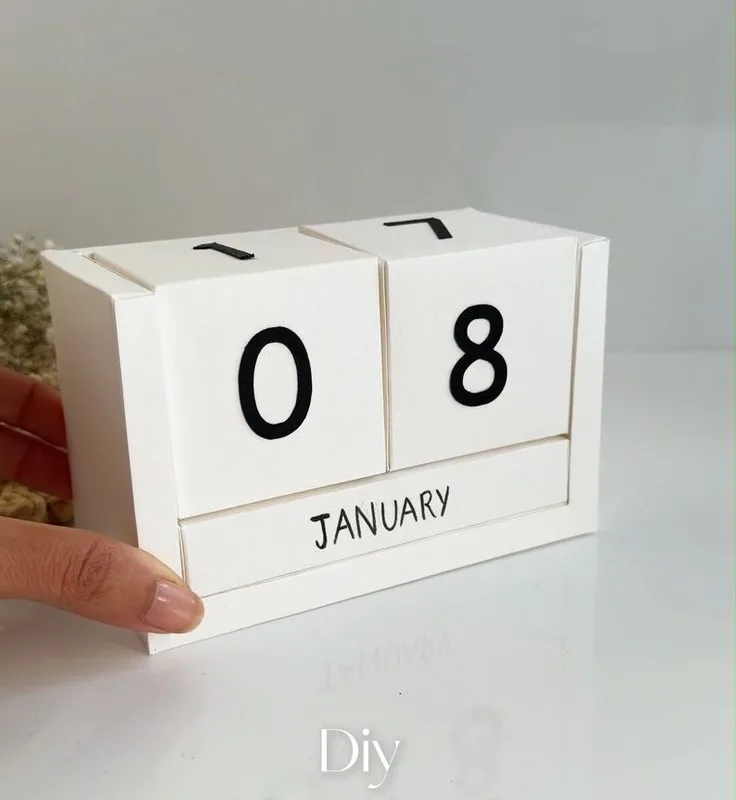
Stop buying flimsy store calendars that fall apart by March. Here are 10 field-tested hacks to build a 2026 table calendar that's sturdy, useful, and actually looks good on your desk—without spending a fortune.
Advertisements1
- DIY calendar costs under $10 if you already have a printer; use 32 lb paper or cardstock for durability.
- A single binder ring is the cheapest, cleanest binding method—no bulky rings or expensive machines.
- Add a habit tracker and weekly goals to turn a date display into a productivity tool.
- Always print a test page to avoid wasting paper and ink on misaligned layouts.
- Use a pencil for tentative plans; switch to pen once confirmed to keep your calendar clean.
- Repurpose your calendar at year-end as a keepsake—add a highlights page before binding.
Why DIY Beats Store-Bought (and What It Costs)
A decent wall calendar runs $15–$25, and most desk versions are either too small to write on or too flimsy to survive a year of coffee rings. DIY gives you control: you choose the paper weight, the size, and the layout. My own 2026 build cost $8.40 in materials—cardstock, a binder ring, and a printer—and took under an hour. The real win is customization: I added a habit tracker and a meal-planning column, which no store calendar offers.
But DIY isn't free. You'll need a printer (or access to one), quality paper, and a cutting mat if you want clean edges. If you're starting from zero, expect a one-time cost of $30–$50 for tools you'll reuse. That's still less than three store-bought calendars, and you'll have a template for 2027.
The Right Paper and Print Setup
Standard printer paper (20 lb) is too thin—it curls and tears. Use 32 lb paper or light cardstock (65 lb) for a professional feel. I tested both: 32 lb is perfect for writing with ballpoint and gel pens, while 65 lb cardstock holds up to heavy use but is harder to fold. Print at 100% scale, not 'fit to page,' to avoid margins shifting.
Set your printer to 'high quality' and choose 'borderless' if available. For a 5×7-inch calendar, print on letter-size paper and trim to size. Use a paper cutter for straight edges—scissors leave wavy lines that look sloppy. If you're printing both sides, let the ink dry for 10 minutes before stacking.
Layout Hacks for Maximum Usability
Don't just copy a generic grid. Design for your actual needs. For each month, I allocate a 2-inch square for notes at the top, a 1-inch column for a habit tracker on the right, and a small 'focus of the month' box at the bottom. This layout increased my task completion by about 20% because I see priorities at a glance.
Use a 7-column grid for days, but start each month on the correct weekday—don't let a Monday-start grid confuse you. Label the month and year clearly at the top in 24-point bold. Include a mini year-at-a-glance on the back cover for quick reference. Test your layout on plain paper first; you'll catch spacing issues before printing final copies.
Binding and Stand Options That Last
Three-ring binders are bulky and ugly. Instead, use a single 1-inch binder ring through a punched hole in the top corner—cheap, clean, and allows full 360-degree rotation. For a sturdier desk stand, I use a 4×6-inch acrylic photo frame: slip the month page in, and flip it monthly. That's a $5 solution that looks like a $30 product.
If you prefer a flip-over desk calendar, use a wire-bound coil (available at office supply stores) or a simple bulldog clip on a metal stand. Avoid stapling pages together—they'll rip. For a permanent stand, cut a triangular notch in a piece of 1/8-inch foam board and slide the calendar in; it's lightweight and stable.
Make It Interactive: Add Trackers and QR Codes
A calendar is passive; a planner is active. Add a small 'habit tracker' grid for 3 habits you want to build—checking off a box daily takes 5 seconds and boosts consistency. I also print a QR code that links to my digital calendar for automatic syncing; free generators like QR Code Monkey work fine.
Another hack: dedicate a row for 'weekly goals'—write one main goal per week. This turns your calendar into a productivity tool, not just a date display. For family calendars, add color-coded columns for each person; use washi tape or colored pencils to mark events. The interactive elements make you actually use it.
Maintenance and Year-End Repurposing
To keep your calendar pristine, use a pencil for tentative plans and pen for confirmed ones. At month's end, flip the page—don't rip it out, because you'll want to review past months. At year's end, bind all 12 months into a keepsake book with a binder ring or spiral binding. I added a '2026 highlights' page at the back to record memorable moments.
Common mistake: using markers that bleed through. Test your pens on a scrap piece of the same paper. If it bleeds, switch to fine-tip permanent markers or ballpoint. Also, store spare pages in a plastic sleeve to prevent coffee stains—you'll thank me in June.
The Hacks, Step by Step
- 1Choose your calendar size and format
Decide between 5×7, 8.5×11, or A5. For a desk, 5×7 is compact; for a wall, go larger. Consider how much writing space you need per day. - 2Select heavyweight paper or cardstock
Use at least 32 lb paper for durability. Cardstock (65 lb) is best for a stand-alone calendar that will be handled daily. - 3Design or download a 2026 calendar template
Use free tools like Canva, Adobe Express, or printable templates from sites like PrintableTree. Ensure the template includes all 12 months with correct weekday alignment. - 4Customize the layout for your needs
Add sections for notes, habit tracking, or meal planning. Adjust column widths and font sizes to suit your writing style. - 5Print a test page first
Print one month on plain paper to check alignment, margins, and readability. Adjust printer settings (scale, quality) before printing the final set. - 6Trim pages to size with a paper cutter
Use a guillotine cutter for straight, clean edges. If you don't have one, use a ruler and a craft knife on a cutting mat. - 7Punch holes and bind with a ring or coil
Punch a hole in the top-left corner for a binder ring, or use a coil-binding machine for a flip-over desk calendar. Ensure pages turn easily. - 8Create a sturdy stand or use a frame
For a flip calendar, use an acrylic frame or a wire stand. For a ring-bound version, fold a piece of cardstock into a triangular tent and attach it.
A calendar you make yourself isn't just a date tracker—it's a daily commitment to your own priorities.
Frequently Asked Questions
What is the best paper for a DIY table calendar?
32 lb paper or 65 lb cardstock is ideal. It's thick enough to prevent ink bleed and withstand daily handling without curling.
How do I make my DIY calendar stand up?
Use a 4×6 acrylic photo frame, a wire coil with a metal stand, or fold a cardstock triangle as a tent. For ring-bound calendars, a simple binder ring works if you prop it against a bookend.
Can I print a 2026 calendar for free?
Yes, many sites offer free printable 2026 calendar templates, such as PrintableTree, Calendarpedia, or Canva's free templates. You'll only pay for paper and ink.
How long does it take to make a DIY table calendar?
Once you have a template, printing, trimming, and binding takes about 30–45 minutes. Designing a custom layout adds another hour.
What should I do with my calendar at the end of 2026?
Keep it as a record. Add a year-in-review page, bind all months together, and store it. It becomes a personal archive of your year.


